


 English
WT9932C61-TINY AT Firmware Getting Started Guide
Update history
| Date | Version | Author | Update content |
|---|---|---|---|
| 2026-11-11 | 1.0.0 | Iris | Added the ESP-AT Getting Started Guide |
1. Tutorial Goals
This guide is intended for users developing with WT9932C61-TINY + ESP-AT. It walks through downloading the ESP-AT firmware package, flashing it with the online tool, verifying AT commands, and connecting the board to a Wi-Fi network.
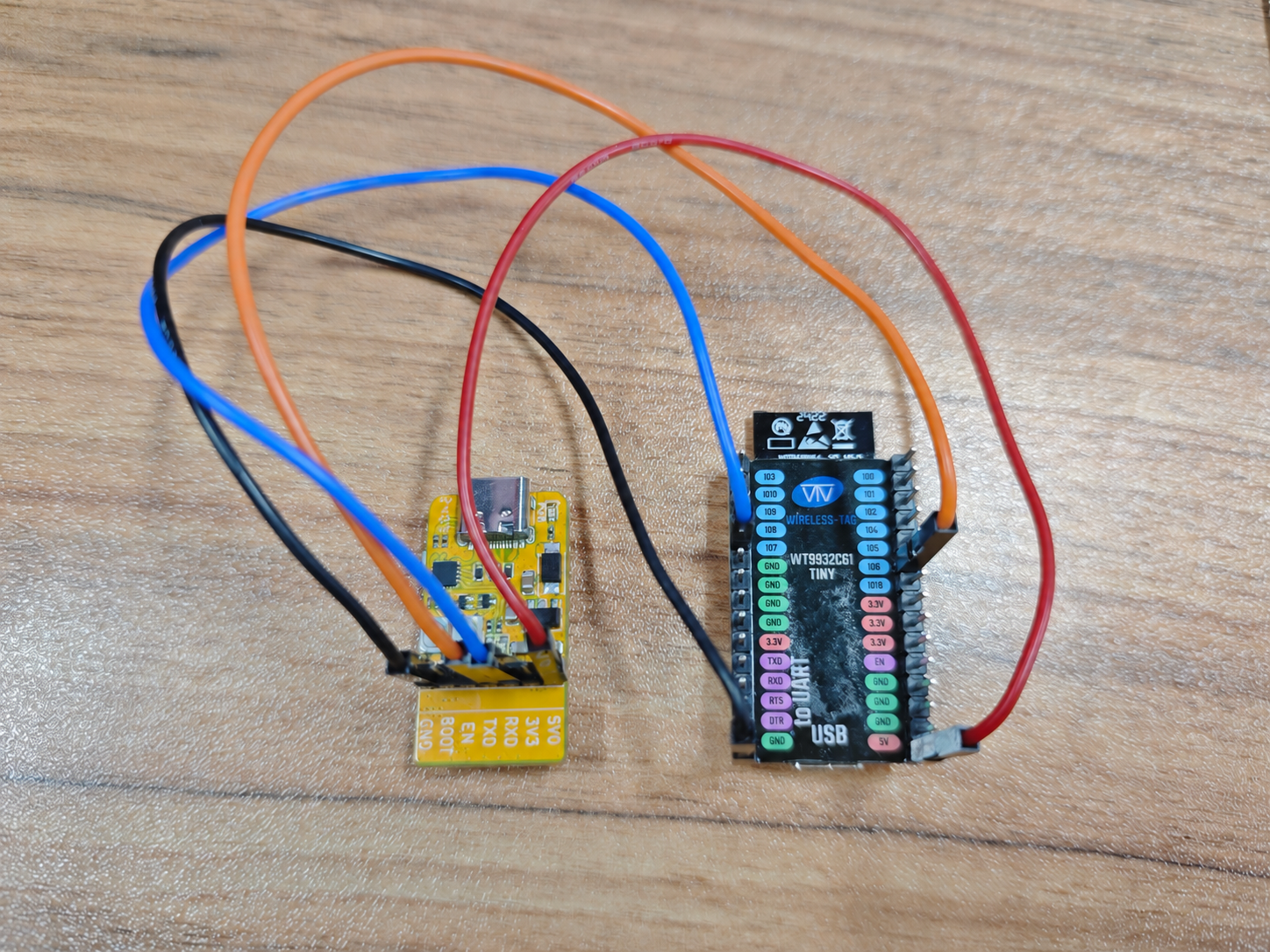
WT9932C61-TINY is based on Espressif's ESP32-C61. The board's USB Type-C interface is used for power, firmware flashing, and log output. The default ESP-AT firmware exchanges AT commands through UART1, so an external USB-to-serial adapter is required for AT command testing. Connect them as follows:
| Development Board Interface | USB-to-Serial Adapter Interface | Description |
|---|---|---|
UART1 RX (GPIO6) |
TX | The adapter sends data to the board |
UART1 TX (GPIO7) |
RX | The board sends data to the adapter |
| 5V | 5V | Power |
| GND | GND | Common ground |
2. Preparation
2.1 Hardware
- One
WT9932C61-TINYdevelopment board - One USB Type-C cable that supports data transfer
- One USB-to-serial adapter
- Several jumper wires
- A Windows, Linux, or macOS computer
- If the serial port is not detected, install the appropriate CH343-series USB-to-serial driver.
Use a reliable data cable and a USB port or power adapter capable of supplying a stable
5V/1A.
2.2 Software
The Wireless-Tag online flashing tool can download firmware packages, erase and flash the device, read chip information, and monitor the serial port directly in the browser. No flashing application needs to be installed in advance.
3. Flashing with the Online Tool
3.1 Downloading the Firmware Package
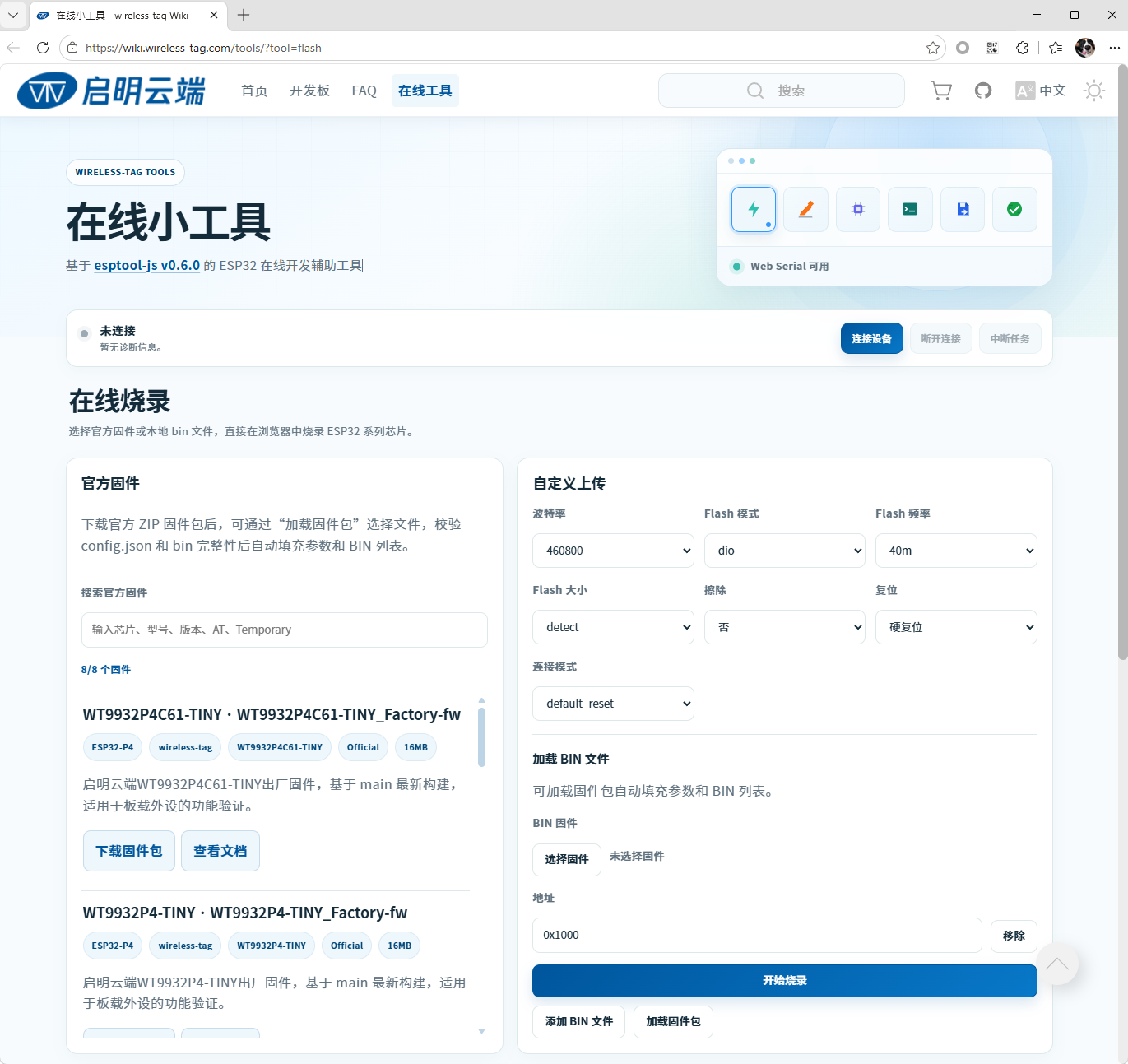
Open the Wireless-Tag online flashing tool. The page appears as shown below:
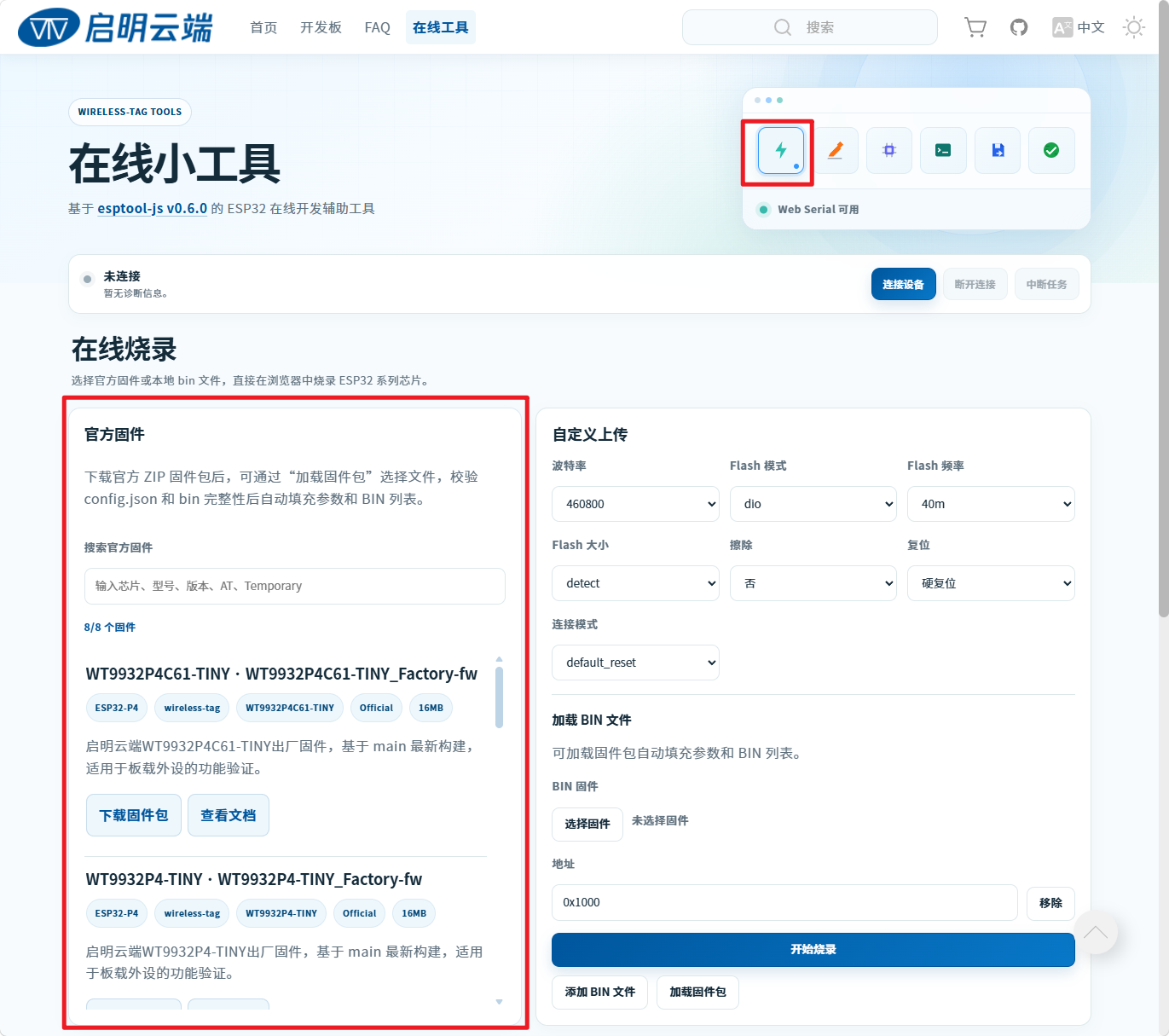
First locate the Online Flashing > Official Firmware section:
Select the WT9932C61-TINY AT temporary firmware and click Download Firmware Package:
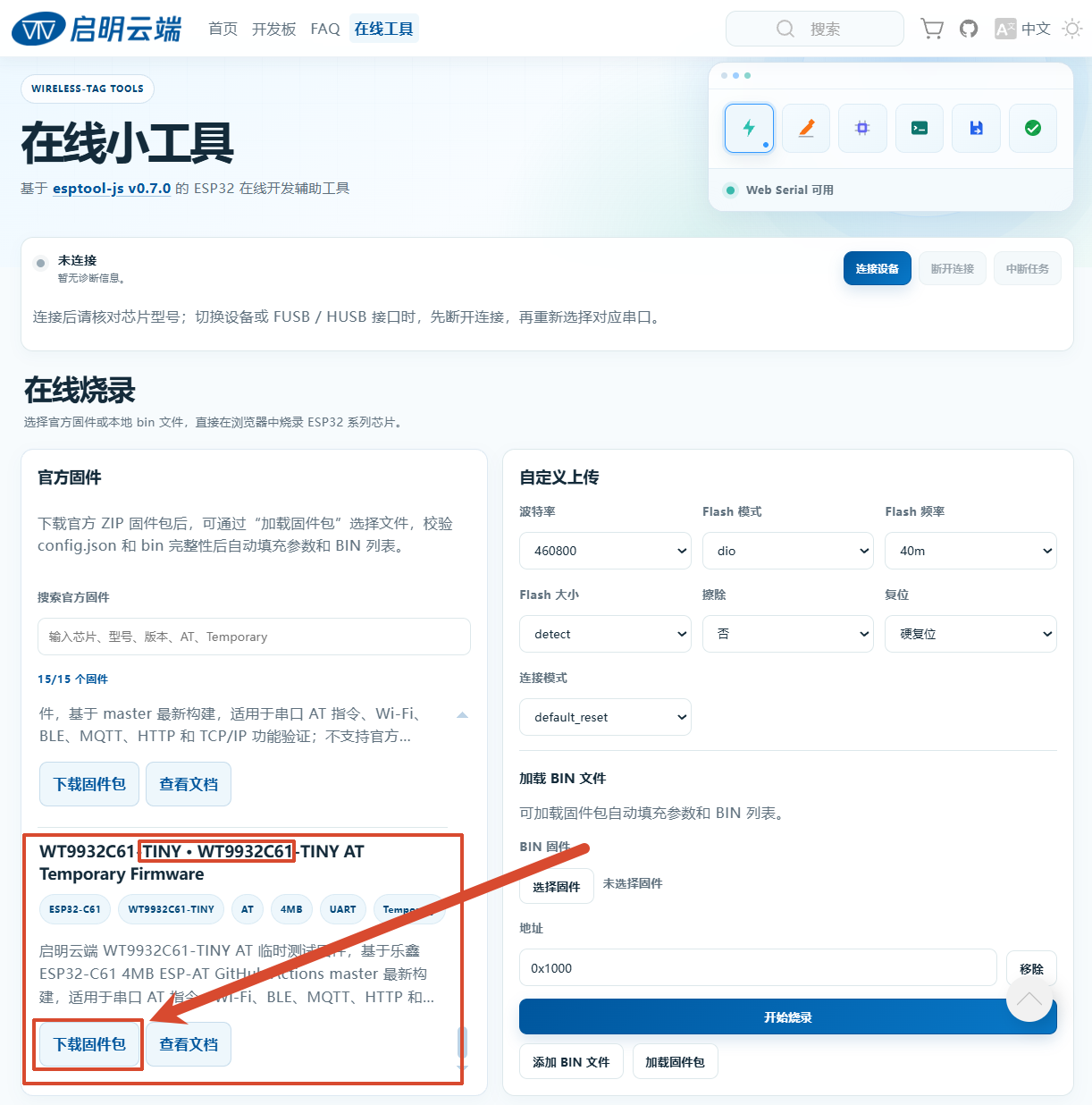
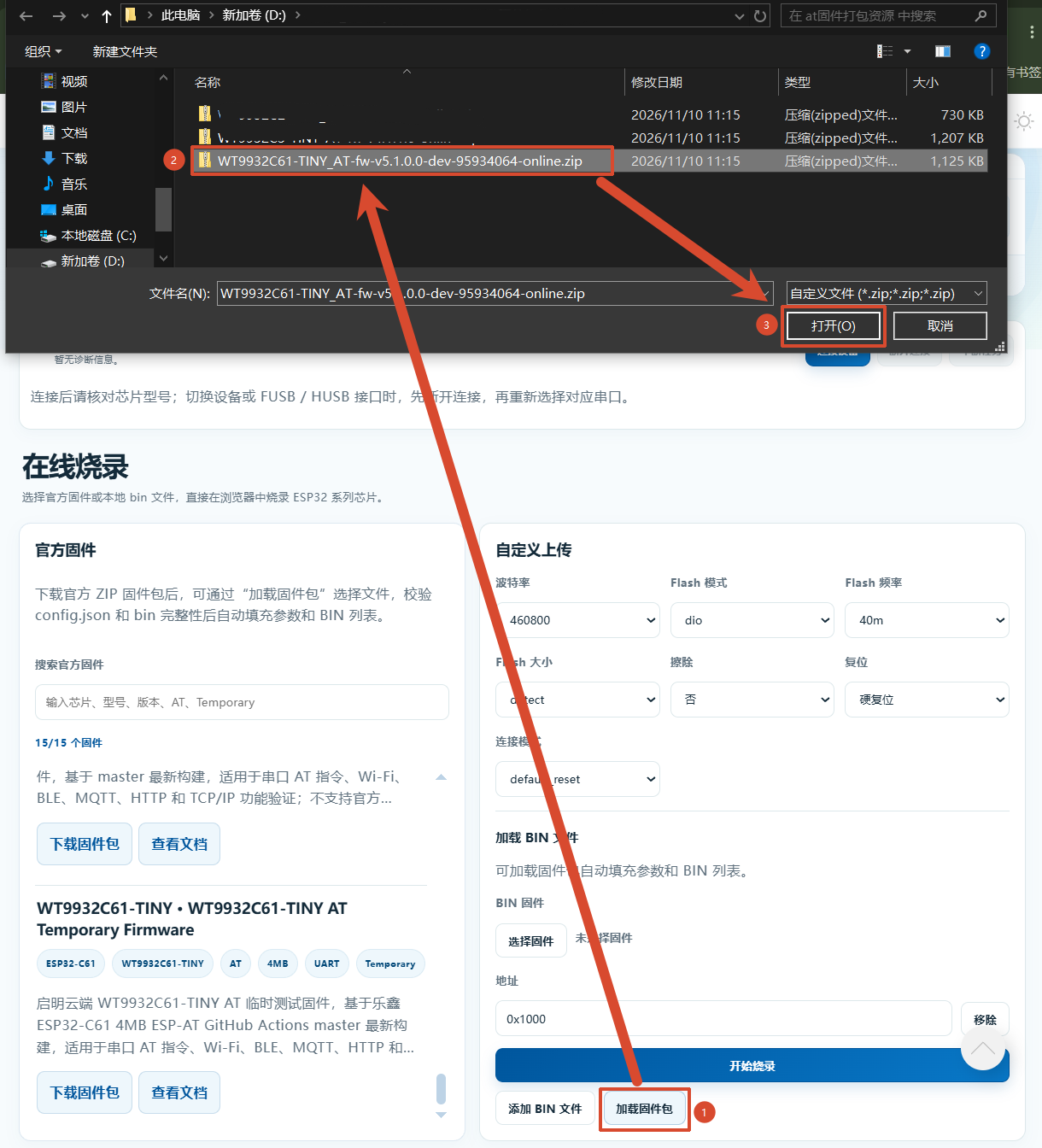
The downloaded package is named WT9932C61-TINY_AT-fw-v5.1.0.0-dev-95934064-online.zip.
Do not extract the online firmware ZIP package. Load the ZIP directly in the following steps.
3.2 Flashing Steps
Connect the board's USB USB Type-C port to the computer with a data cable.
In the online tool, click Connect Device, choose the serial port for the board, and then click Connect.
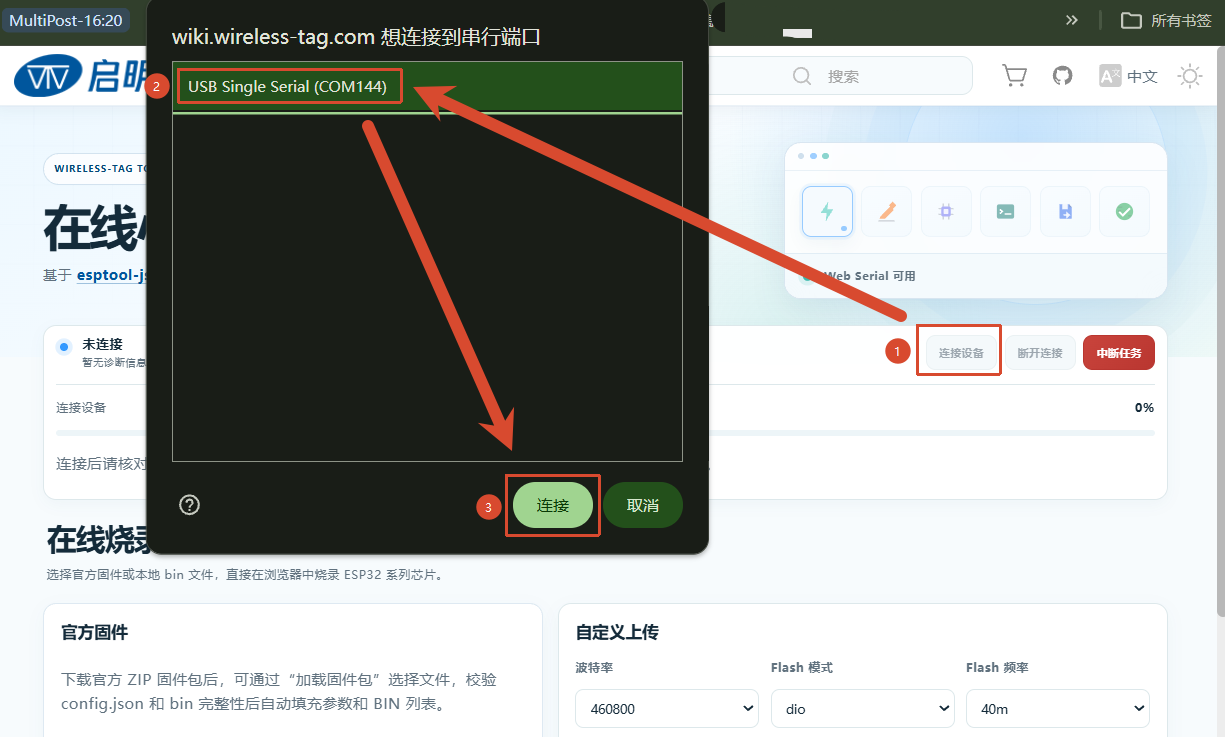
The dialog may list several ports. If you are unsure which one belongs to the board, disconnect other serial devices or reconnect this board and observe which port appears.
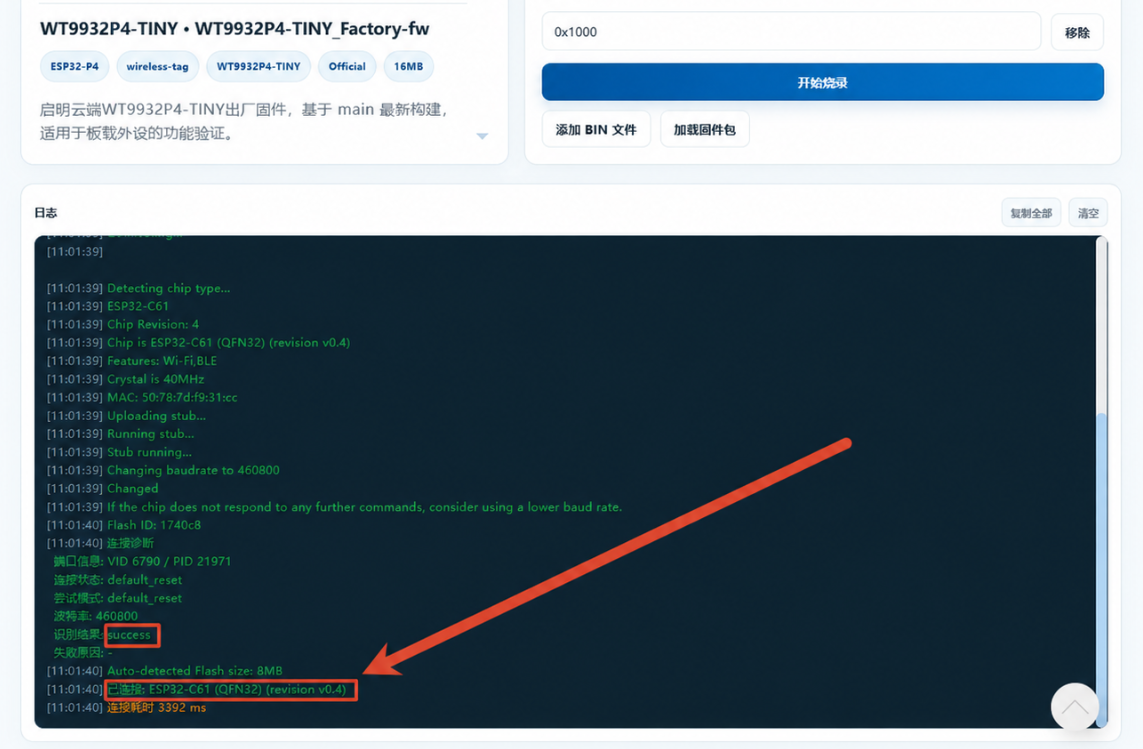
Check the log area at the bottom of the page. A successful connection is shown below:
Click Load Firmware Package and select WT9932C61-TINY_AT-fw-v5.1.0.0-dev-95934064-online.zip.
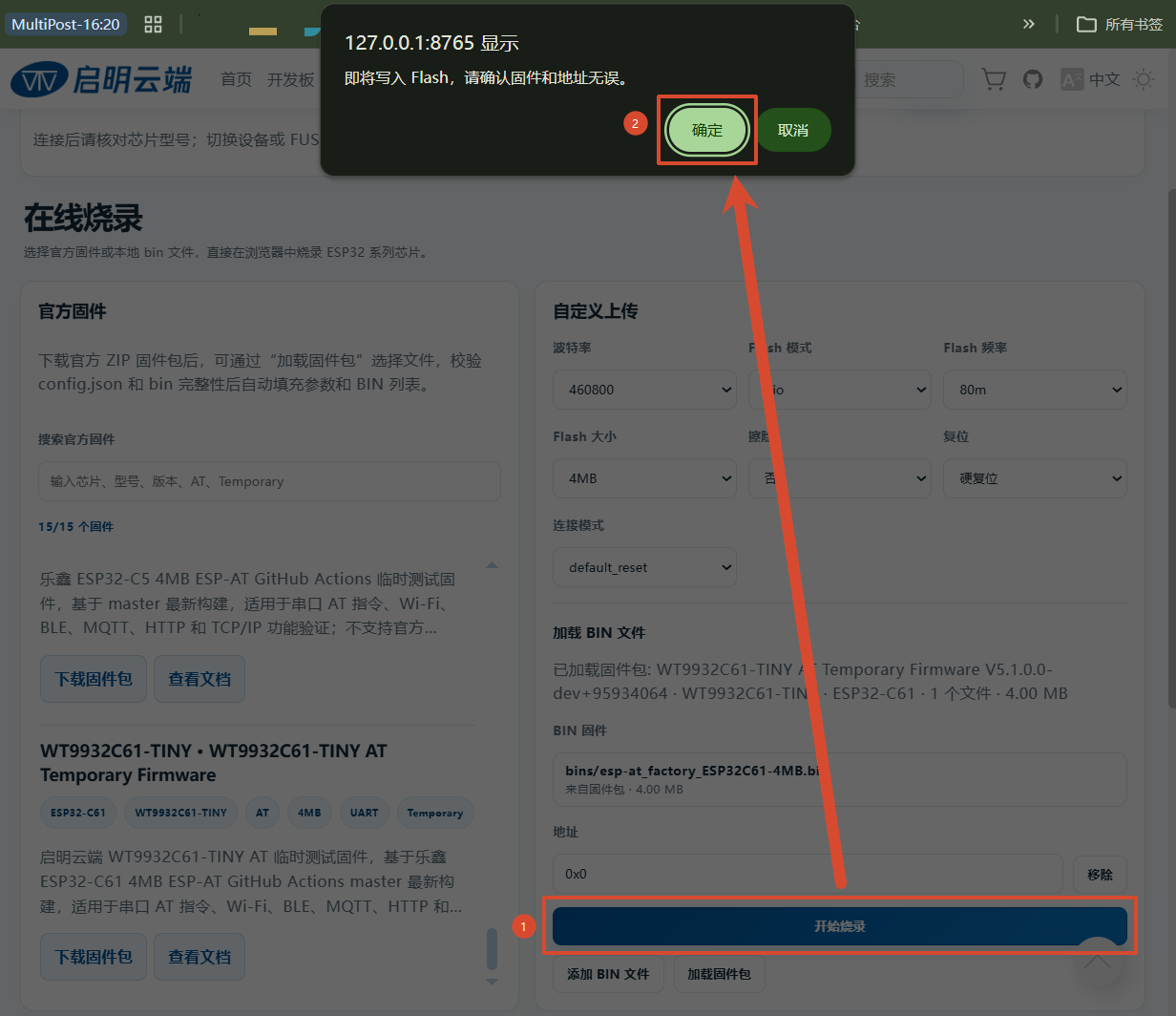
Click Start Flashing, then confirm the operation in the dialog. Do not disconnect the cable or close the page while flashing is in progress.
Wait for the completion message:
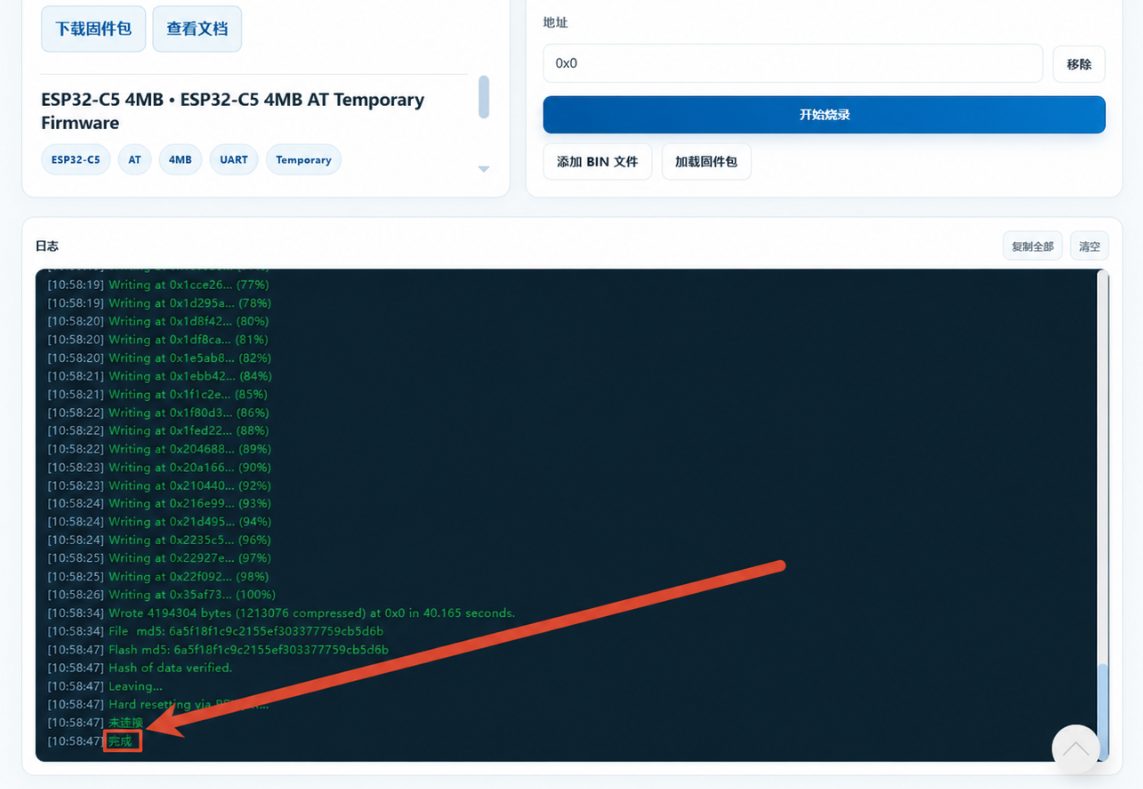
The firmware is now installed and ready for verification.
4. AT Command Test
After flashing is complete, disconnect the USB Type-C cable from the board.
Connect the USB-to-serial adapter to WT9932C61-TINY. The TX and RX wires must be crossed:
- Adapter TX → GPIO6
- Adapter RX → GPIO7
- Adapter 5V → 5V
- Adapter GND → GND
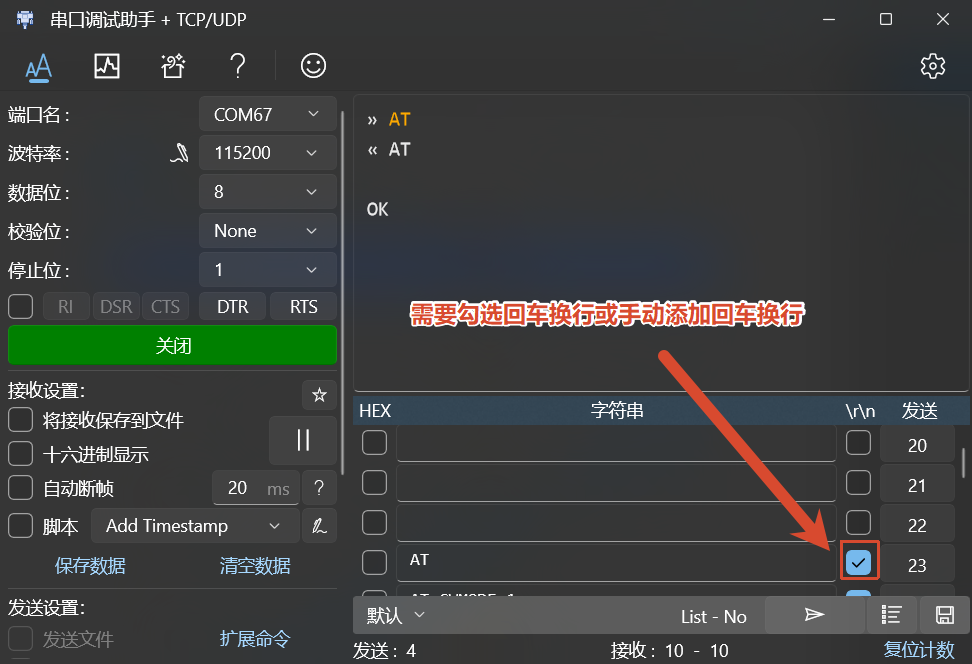
Connect the adapter to the computer. Open its serial port with 115200 baud, 8N1, and no flow control. Send AT\r\n; the board should return OK.
5. Wi-Fi Provisioning
After the AT command returns OK, send the following commands in order to connect the board to a Wi-Fi router or hotspot.
Append carriage return and line feed to every command.
| AT Command | Purpose | Successful Response |
|---|---|---|
AT+CWMODE=1 |
Set the board to Station mode | OK |
AT+CWLAP |
Scan for nearby Wi-Fi networks | One or more +CWLAP: entries followed by OK |
AT+CWJAP="YOUR_WIFI_SSID","YOUR_WIFI_PASSWORD" |
Connect using the specified SSID and password | WIFI CONNECTED, WIFI GOT IP, and OK |
AT+CWSTATE? |
Query the current Wi-Fi connection state | +CWSTATE:2,"SSID" means connected with an IPv4 address |
AT+CIPSTA? |
Query the assigned IP address, gateway, and subnet mask | Returns ip, gateway, and netmask |
The following is a complete example. Replace the example Wi-Fi name and password with the values for your network:
» AT
« AT
OK
» AT+CWMODE=1
« AT+CWMODE=1
OK
» AT+CWLAP
« AT+CWLAP
+CWLAP:(3,"CMW-AP2025",-52,"fc:34:97:04:61:80",5,-1,-1,4,4,7,1)
+CWLAP:(4,"Aiming",-52,"4c:b7:e0:97:6d:32",1,-1,-1,4,4,7,0)
+CWLAP:(3,"TEST",-57,"a6:d8:ca:82:34:56",11,-1,-1,4,4,6,0)
+CWLAP:(3,"HUAWEI",-58,"42:37:8d:dc:b0:c3",6,-1,-1,4,4,7,1)
+CWLAP:(3,"bing",-60,"d4:ee:07:5b:77:a8",11,-1,-1,4,4,6,0)
+CWLAP:(3,"CMCC",-61,"f2:a8:33:70:7c:4d",11,-1,-1,4,4,7,0)
OK
» AT+CWJAP="CMW-AP2025","12345678"
« AT+CWJAP="CMW-AP2025","12345678"
WIFI CONNECTED
WIFI GOT IP
OK
» AT+CWSTATE?
« AT+CWSTATE?
+CWSTATE:2,"CMW-AP2025"
OK
» AT+CIPSTA?
« AT+CIPSTA?
+CIPSTA:ip:"192.168.50.182"
+CIPSTA:gateway:"192.168.50.1"
+CIPSTA:netmask:"255.255.255.0"
OK
A valid IP address from
AT+CIPSTA?confirms that provisioning succeeded. If the SSID or password contains commas, double quotation marks, or backslashes, escape those characters as required by the ESP-AT documentation.
6. Further Learning
After completing firmware flashing, AT command communication, and Wi-Fi provisioning, the basic ESP-AT workflow for WT9932C61-TINY is ready. Continue with the official ESP-AT guides for more commands and advanced features.
7. References
| Document | Link | Description |
|---|---|---|
| ESP-AT User Guide in Chinese | Open guide | Official ESP32-C61 ESP-AT getting started, hardware connection, and firmware download guide in Chinese |
| ESP-AT User Guide in English | Open guide | Official ESP32-C61 ESP-AT getting started guide in English |
| ESP-AT Source Repository | GitHub repository | Espressif's official ESP-AT source code, release branches, and development resources |
| Wireless-Tag ESP-AT Repository | GitHub repository | ESP-AT firmware projects and related development resources maintained by Wireless-Tag. |
| ESP32-C61 ESP-IDF Programming Guide | Open documentation | ESP-IDF programming guide and API documentation |
| ESP32-C61 Datasheet | Open datasheet | ESP32-C61 chip specifications |