


 English
WT99C202-S2 Beginner's Guide
Update history
| Date | Version | Author | Update content |
|---|---|---|---|
| 2025-12-23 | 1.0.0 | Lai | Initial document release |
📖 Project Overview
This SDK is specifically designed for the WT99C202-AI and WT99C302-AI development boards. It is based on the ESP32C2 / ESP32C3 main control chips, the CI1302 voice recognition chip, and the AISpeech platform, providing a complete solution for local voice wake-up and cloud-based real-time voice interaction.
This solution integrates core features such as Wi-Fi provisioning, speech recognition, WebSocket real-time communication, TTS audio playback, OTA upgrades for ESP32C2 / ESP32C3, as well as updating specific versions of wake words and local command words. It is suitable for the development of smart voice assistants and voice-interactive devices.
⭐️ Key Features
- 🎤 Local voice wake-up and recognition (based on CI1302)
- 🌐 Real-time cloud voice interaction via WebSocket
- 📶 Supports BLUFI Bluetooth provisioning
- 🔊 Local audio playback
- 🔄 Remote OTA upgrades
- 💾 Local configuration and audio resource storage
- 🔔 Synchronization and update of multiple prompt tone voices
- ⏹️ Local interruption mechanism supporting button and voice interruption
- 🎚️ Supports voice control for volume adjustment and exiting conversations
- 🎯 Supports local command word recognition on the voice chip
- 🔄 Supports OTA updates of specific wake words and command word models for the voice chip
🔧 Function Overview
- Wi-Fi Provisioning: Supports one-click configuration, AP/STA mode switching, and network reset
- CI1302 Driver Support: Efficient UART communication protocol, supporting voice wake-up and command recognition
- Cloud Conversation: Real-time interaction with AI cloud services via WebSocket protocol, supporting streaming voice transmission
- Local Playback: Supports local TTS audio playback with compatibility for multiple audio formats
- OTA Upgrade: Remote firmware update mechanism to ensure continuous feature optimization
- Button Control: Supports voice wake-up, conversation interruption, session exit, and Wi-Fi reset
- LED Indicators: Real-time display of device status (network connection, active conversation, standby mode, etc.)
- Voice Control: Supports local control functions such as volume adjustment and exiting the current conversation via voice commands
- Local Interruption: Supports local interruption during conversations, significantly improving user interaction experience
- Local Command Words: After CI1302 recognizes a command word, it notifies ESP32C2 / ESP32C3 for processing. Custom actions can be added in
aiha_local_asr_detected_cb
🛠️ Development Environment
Basic Dependencies
- ESP-IDF v5.5
- ESP-ADF v2.7
- QMSD ESP32 SDK (already integrated in the project)
Environment Verification Steps
- Ensure that
idf.pycan successfully compile the ESP-IDF example projectget-started/hello_world - Compile an ESP-ADF example project such as
player/pipeline_spiffs_mp3to verify correct ADF configuration - Import the
ADF_PATHenvironment variable and modifyCMakeLists.txtas follows:
if(NOT DEFINED ENV{ADF_PATH})
    set(ENV{ADF_PATH} "/home/sorz/environment/esp-adf(installation_directory_of_adf)")
endif()
- Compile this project
📁 Project Structure
├── main/ # Main application
│ ├── asr_ota_file/ # CI1302 wake word update component
│ ├── chat/ # Voice chat control logic
│ ├── network/ # Network management and OTA
│ ├── tone_res/ # Local prompt tone resources
│ └── debug/ # Debug-related code
├── components/ # Custom components
│ ├── ci1302_protocol/ # CI1302 driver, protocol, and voice chip OTA component
│ ├── audio_player/ # Audio playback support
│ ├── aiha_server/ # WebSocket interaction component
│ ├── WT99C202_C302/ # Hardware abstraction layer
│ └── storage_nvs/ # NVS local storage management
├── qmsd_esp32_sdk/ # QMSD platform SDK
└── docs/ # Documentation
🚀 User Guide
Startup Flow
- After power-on, the device plays a startup welcome message
- If no Wi-Fi configuration is detected, the device automatically enters provisioning mode
(please use the “AISpeech AIHA Smart Hardware” mini-program for provisioning) - After successful provisioning, the device enters standby mode and waits for a voice wake-up command
- After the user says the preset wake word
Hello Xiaoming, the device enters voice conversation mode - Users can interact via voice commands or button operations as needed
Button Function Description
- Single short press: Exit the current voice session and return to standby mode
- Six consecutive short presses: Clear saved Wi-Fi configuration and reboot the device
Configuration Notes
- Volume control range: 0–100 levels, configuration is automatically saved to NVS
- Wi-Fi configuration: Connection information is automatically saved to NVS and retained after power-off
Build Process
- Set the IDF and ADF environment variables. It is recommended to use ESP-IDF 5.5 and ESP-ADF 2.7 to ensure optimal compatibility and stability
- Set the target chip according to the development board
For WT99C202, useidf.py set-target esp32c2
For WT99C302, useidf.py set-target esp32c3 - WT99C202 development board uses a 26 MHz crystal with a default baud rate of 74880; WT99C302 uses a 40 MHz crystal with a baud rate of 115200
Wake Words and Command Words
- Firmware containing the required wake words and command words is embedded into the ESP32C2 / ESP32C3 firmware
- After power-on, the device automatically detects and performs OTA updates if needed
How to Flash Factory Firmware
Preparation
For flashing firmware on the WT99C202-AI-S2 development board, the following hardware and software are required:
- Hardware:
WT99C202-AI-S2development board × 1USB-to-UARTadapter × 1Soldered wires× 5- Personal computer × 1
- Software:
ESP32-C2 Firmware Flashing
Before flashing, ensure that the wiring has been prepared. Refer to the diagram below for connections:
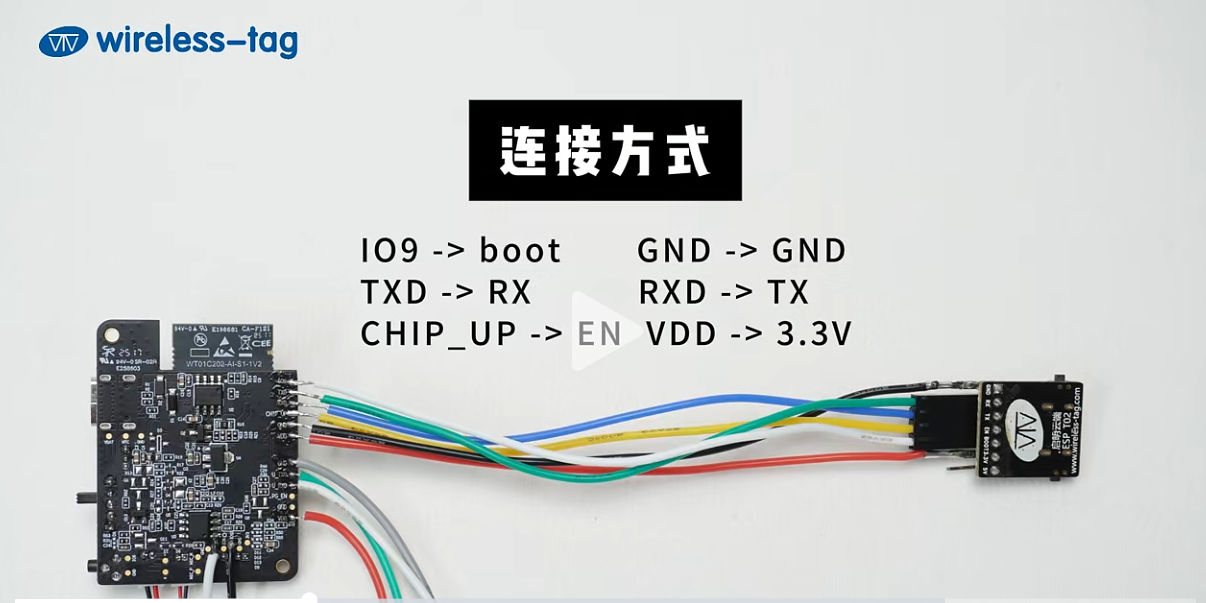
Open the flash download tool and double-click the .exe file to enter the tool’s main interface.
Set ChipType to ESP32C2 as shown below:
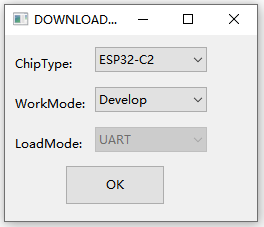
Click OK to enter the main flashing page.
Fill in the firmware file and the corresponding flash address, and check the checkbox in front of the file.
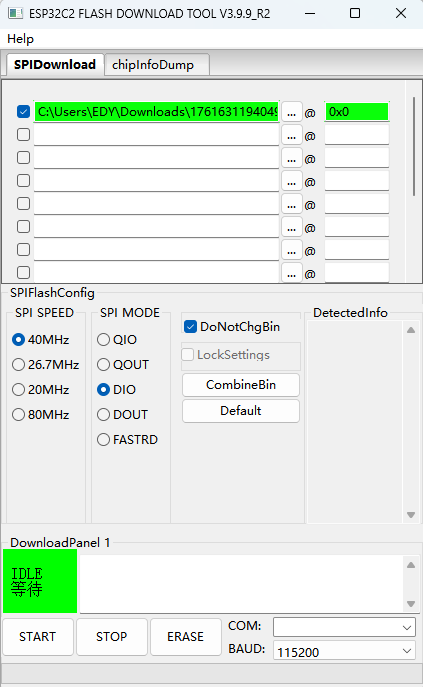
Click START to begin flashing.
CI1302 Firmware Flashing
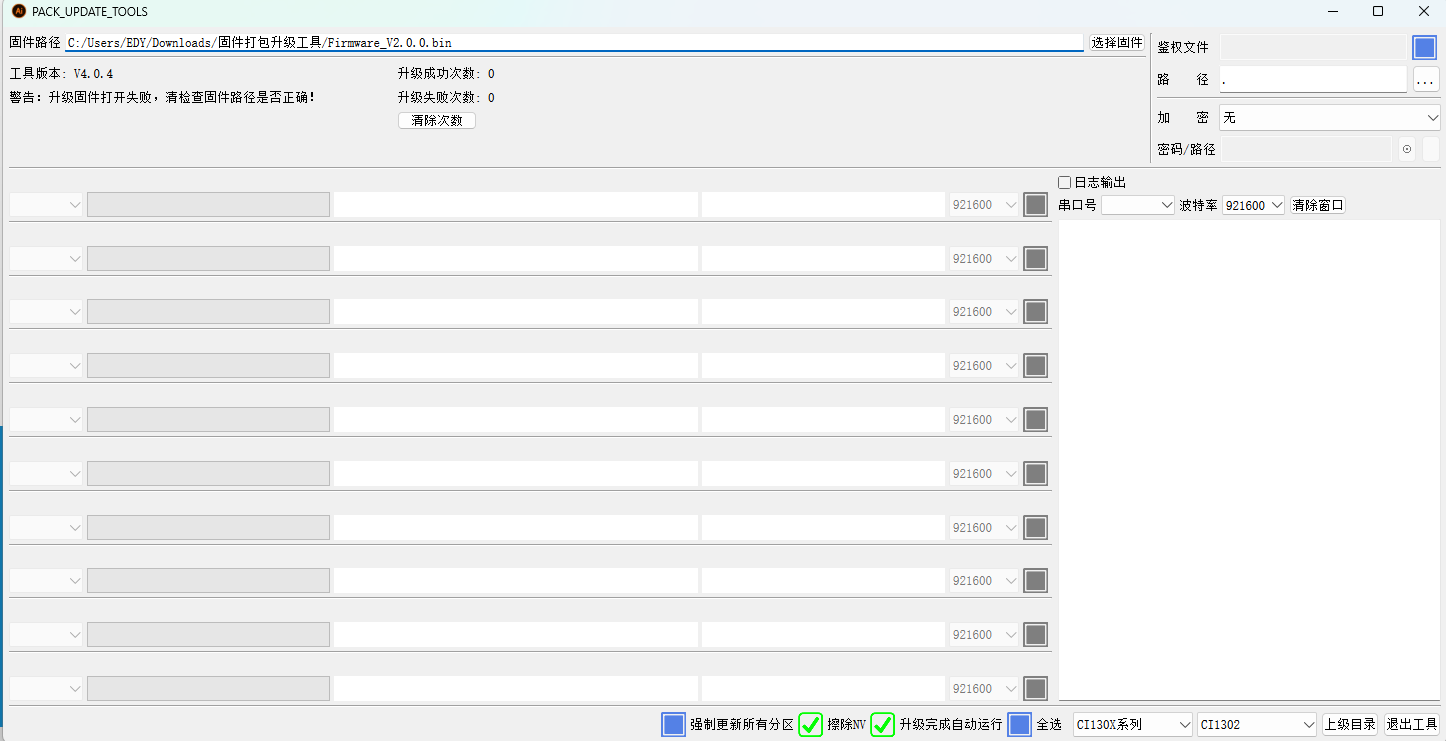
Open PACK_UPDATE_TOOL.exe, select the CI130X series and the CI1302 chip, then click Firmware Upgrade.
Follow the on-screen instructions to enter download mode. The interface is shown below:
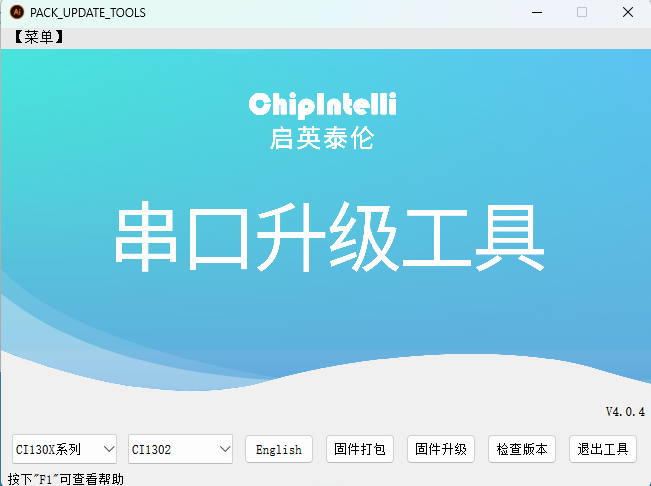
Enter the main flashing page, load the firmware file, and check the checkbox in front of the file to start flashing.
⚠️ Notes
Performance and Stability
- Cloud-based conversations may experience slight latency, mainly affected by network transmission speed and VAD (Voice Activity Detection) control strategies
- It is recommended to operate the device in a stable Wi-Fi environment for optimal performance
- In the current version (hardware V1.1, software V1.0.0), battery level detection is for reference only
When no battery is connected or charging, the battery level may be inaccurate
You may comment outbattery_manage_initto disable battery prompts
Development Recommendations
- It is recommended to view all device runtime logs via a serial monitor for troubleshooting and debugging
- Ensure that hardware components such as microphones, speakers, and buttons are properly connected
- If you are not familiar with ESP-IDF, avoid modifying contents under
components_adfto prevent build failures
🆘 FAQ
| Issue | Solution |
|---|---|
| Build failure | Check IDF/ADF path configuration and version compatibility |
| Wi-Fi provisioning failure | Check Wi-Fi SSID/password and router status |
| Voice recognition not working | Check microphone hardware connection and ambient background noise |
| Abnormal audio playback | Check speaker connection and supported audio encoding formats |
| Flash runtime error | Check flash compatibility with the IDF version, try IDF 5.3.2 or others |
📚 Technical Support and Resources
- ESP-IDF Official Documentation
- ESP-ADF Official Documentation
- For the voice chip OTA process, refer to
main/asr_ota_file/readme.md - Schematics and user guides can be found in the
docsdirectory of the project