


 English
WT9932S31-TINY Development Board Resources
2026-10-25
Update history
| Date | Version | Author | Update content |
|---|---|---|---|
| 2026-10-25 | 1.0.2 | YobieZhou | Add the English resource page and links to the official English ESP32-S31 documentation |
| 2026-10-23 | 1.0.0 | YobieZhou | Add open hardware and software, user guides, schematic, pinout, mechanical files, and firmware resources |
| 2026-10-23 | 1.0.1 | YobieZhou | Remove the factory firmware and source code section and renumber the resources |
1. Open Source Hardware & Software
Open Hardware · OSHWHub
https://oshwhub.com/tiny-development-board-studio/project_oapwzduu Open Source Software · GitHub
https://github.com/Wireless-TAG-Maker/WT_BSP

https://oshwhub.com/tiny-development-board-studio/project_oapwzduu Open Source Software · GitHub
https://github.com/Wireless-TAG-Maker/WT_BSP
2. WT9932S31-TINY Development Board User Guide
English version (V1.1):
Chinese version (V1.1):
3. WT9932S31-TINY Schematic
📥 Download Schematic PDF (V1.0)
4. WT9932S31-TINY Pinout
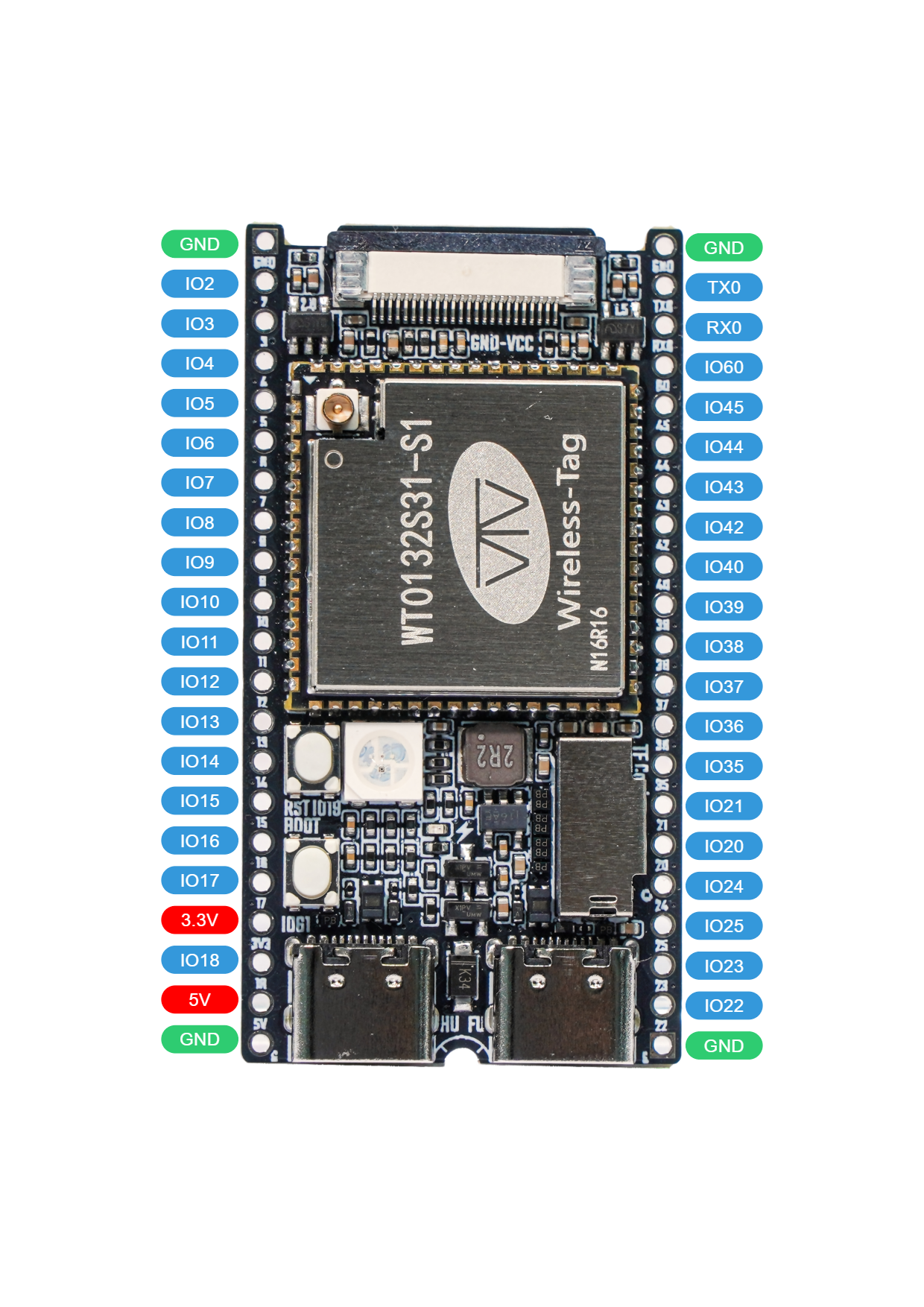
📥 Download Pinout Image (V1.0)
See Board Features for interface functions and detailed descriptions of each pin header.
5. WT9932S31-TINY CAD and Outline Drawing
The board measures approximately 54 × 28 mm. The mechanical drawing in the user guide gives a reference outline of 53.52 × 27.98 mm. Refer to the mechanical files for the exact hole locations, mounting features, and assembly dimensions.
📥 Download CAD File (DWG, V1.0)
6. WT9932S31-TINY 3D Model
📥 Download 3D Model (STEP, V1.0)
7. External References
| Document | Description |
|---|---|
| ESP32-S31 Series Datasheet | Chip features, pin multiplexing, boot configurations, power requirements, and electrical characteristics |
| ESP32-S31 Technical Reference Manual | Memory, peripheral controllers, and register descriptions |
| ESP32-S31 Hardware Design Guidelines | Design requirements for power, reset, RF, memory, and peripherals |
| ESP32-S31 PCB Layout Design Guidelines | Placement and routing requirements for power, RF, USB, and other interfaces |
| ESP32-S31 Series SoC Errata | Known issues, affected revisions, and workarounds |
| ESP32-S31 ESP-IDF Programming Guide | Development environment, driver APIs, and system features |
| USB Drivers and Serial Connection | Device identification, driver installation, and flashing port selection |