


 English
WT99P461-S1 Getting Started Guide
Update history
| Date | Version | Author | Update content |
|---|---|---|---|
| 2026-10-08 | 1.0.0 | Pail | Initial document release |
This tutorial explains how to use the example projects for WT99P461-S1 on Wireless-Tag's GitHub, including MIPI DSI displays, cameras, and more.
- 🎯 Smartphone-style UI - Based on the ESP-Brookesia framework
- 📱 Multiple Applications - Calculator, music player, video player, 2048 game, and camera app
- 🤖 AI Vision - Face detection and pedestrian detection
- 🖥️ High-Definition Display - MIPI DSI (JD9165) + GT911 touch controller
- 🎵 Audio Processing - MP3 decoding and audio playback (ES8311)
- 🎬 Video Processing - The video player currently supports MJPEG
- 💾 Multiple Storage Options - SPIFFS + microSD (TF) card (SDMMC Slot1 + analog switch)
- 🌐 Network Connectivity - Wi-Fi/BLE (Hosted SPI → C61) + Ethernet (IP101)
- 📷 Camera Support - SC2336 MIPI CSI, RAW8 at 1024×600 and 30 fps by default
- 💡 Onboard RGB LED - WS2812 (GPIO54), driven by
espressif/led_strip
Video Player Features
Supported Video Formats
Note: Video Playback
- Store MJPEG videos on an SD card and insert the card into the SD card slot.
- Currently, only MJPEG videos are supported.
- After you insert the SD card, the video player app automatically appears in the UI.
Video Format Conversion
Tip: Converting Videos
- Install ffmpeg:
sudo apt update
sudo apt install ffmpeg
- Convert the video using ffmpeg:
ffmpeg -i YOUR_INPUT_FILE_NAME.mp4 -vcodec mjpeg -q:v 2 -vf "scale=1024:600" -acodec copy YOUR_OUTPUT_FILE_NAME.mjpeg
How to Use the Video Player
Prepare the Video Files
- Convert the videos to MJPEG using the method above.
- Set the resolution to 1024x600 for the best display results.
Set Up the SD Card
- Insert a formatted SD card into the SD card slot.
- Copy the converted MJPEG files to the SD card.
Launch the Video Player
- The video player app automatically reads the SD card.
- Select a video from the detected file list to play it.
Environment Setup
Hardware Requirements
- Development Board: WT99P461_S1_1V1 (ESP32-P4 host + ESP32-C61 inside the module)
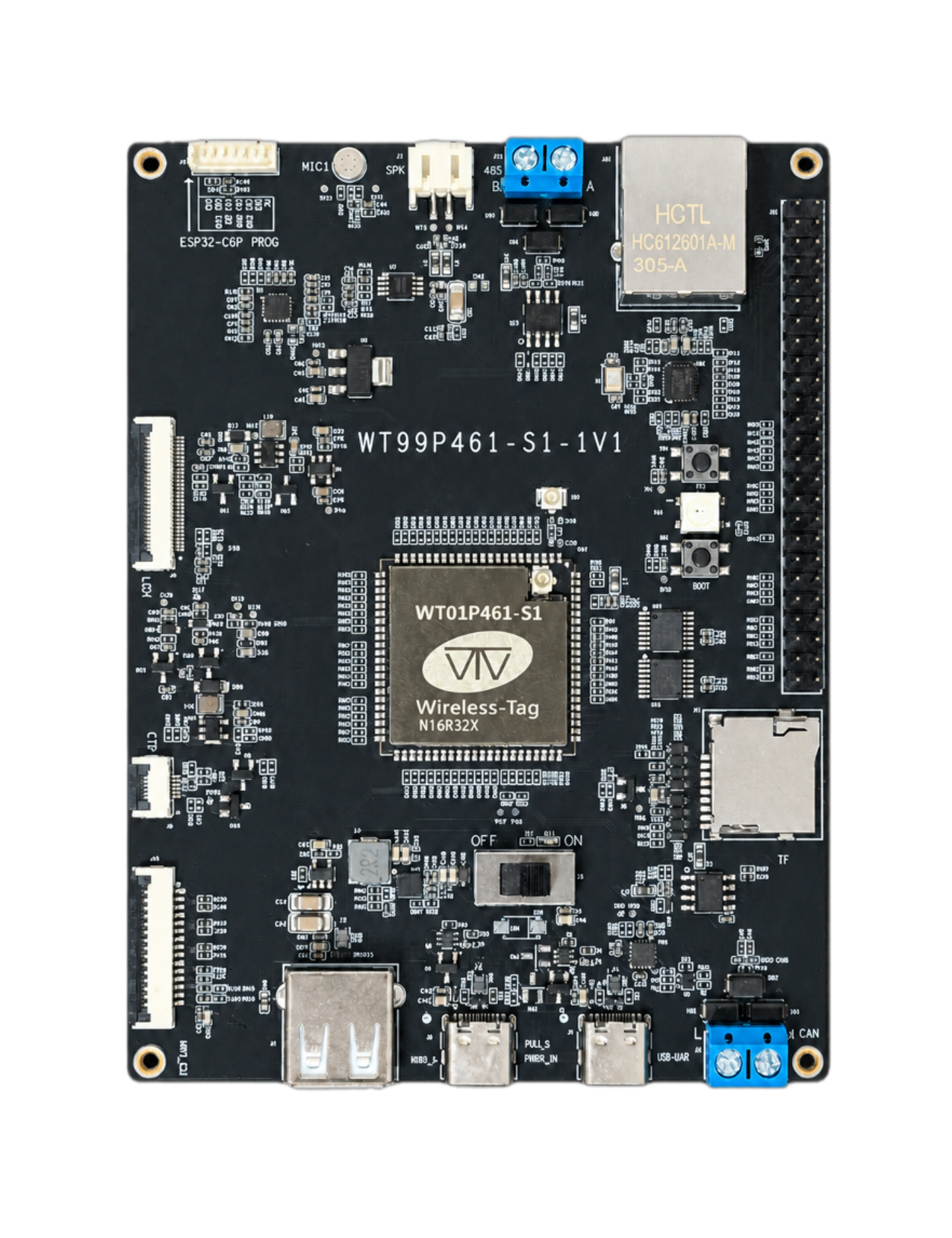
- Display: MIPI DSI (JD9165) + touch controller (GT911)
- Storage: microSD (TF) card (optional; uses a separate bus from Hosted SPI and is selected through a switch controlled by GPIO33)
- Camera: SC2336 (MIPI CSI, RAW8 at 1024×600 and 30 fps by default)
- Speaker: 3W
- RGB LED: Onboard WS2812, with its data pin connected to GPIO54
Software Environment Setup
1. Install ESP-IDF
Follow the official documentation to install ESP-IDF v6.0.1:
2. Clone the Project
git clone <project-repository-url>
cd WT99P461_S1_1V1
3. Configure Environment Variables
. ${IDF_PATH}/export.sh
4. Install Project Dependencies
# Install managed component dependencies
idf.py reconfigure
5. Build and Flash
# Configure the project
idf.py menuconfig

# Build the project
idf.py build

# Flash to the device
idf.py flash

# View serial output
idf.py monitor
Wi-Fi/BLE Usage
Overview
- The ESP32-P4 does not have built-in Wi-Fi/BLE. The ESP32-C61 inside the module provides wireless connectivity as an ESP-Hosted slave.
- The default transport is full-duplex SPI, using the module's existing SDIO wiring pin assignments. It is not SDIO. See
sdkconfig.defaultsfor the default host configuration. - The slave reset pin is GPIO13, connected to the C61's
CHIP_PU/EN.
Hosted SPI Pin Assignments (Board Defaults)
| Signal | P4 (Host) | C61 (Slave) |
|---|---|---|
| MOSI | GPIO14 | GPIO27 |
| MISO | GPIO15 | GPIO28 |
| CLK | GPIO18 | GPIO26 |
| CS | GPIO19 | GPIO25 |
| HS | GPIO16 | GPIO22 |
| DR | GPIO17 | GPIO23 |
| RST | GPIO13 | EN / CHIP_PU |
SPI mode 3 is used. GPIO20/21 on the C61 are used for Flash and cannot be used as transport pins.
Usage
ESP32-P4 Host Project Configuration
Confirm That the Slave Target Is ESP32-C61
(Top) → Component config → Wi-Fi Remote → choose slave target
The default should be ESP32C61. The transport and reset pins are already set in sdkconfig.defaults to match the SPI mapping above.
Project Directory Structure
WT99P461_S1_1V1/
├── main/                           # Main application (P4 host)
│   ├── main.cpp
│   ├── CMakeLists.txt
│   └── idf_component.yml           # Includes esp_hosted, led_strip, etc.
├── components/
│   ├── apps/                       # Calculator/camera/music/video/2048/settings
│   ├── human_face_detect/
│   ├── pedestrian_detect/
│   ├── wt99p461_s1_board/           # Board BSP (including the WS2812 API)
│   ├── bsp_extra/
│   └── esp_lcd_jd9165/              # Board LCD driver (local component)
├── managed_components/             # Downloaded by the Component Manager; do not edit manually
├── tools/                          # C61 slave build/flashing scripts, etc.
├── firmware/                       # Prebuilt host/slave firmware packages
├── spiffs/
├── sdkconfig.defaults              # Includes Hosted SPI and the GPIO13 reset configuration
├── partitions.csv
└── README_CN.md
Core Components
1. Main Application (main/)
- main.cpp: The application entry point. Initializes the system, display, storage, networking, and other modules, then launches the apps.
2. Applications (components/apps/)
- calculator/: Calculator app with basic arithmetic operations
- camera/: Camera app with photo capture and video preview
- game_2048/: Classic 2048 number game
- music_player/: Music player with MP3 support
- setting/: System settings app
- video_player/: Video player with H.264 support
3. AI Vision Components
- human_face_detect/: Face detection algorithm implementation
- pedestrian_detect/: Pedestrian detection algorithm implementation
4. Hardware Abstraction Layer
- wt99p461_s1_board/: Board-specific BSP (display/touch/audio/microSD/Ethernet/WS2812, etc.)
- bsp_extra/: Additional BSP functionality
- esp_lcd_jd9165/: JD9165 MIPI DSI panel driver
5. Storage and Resources
- spiffs/: Built-in file system for application resources and configuration files
- mp4/: Video file storage directory
Partition Configuration
Info: Custom Partition Table (
partitions.csv)
- nvs (24KB): Non-volatile storage for configuration data
- phy_init (4KB): RF calibration data
- factory (9MB): Application firmware
- storage (4MB): SPIFFS file system
Development and Debugging
Viewing Logs
idf.py monitor
Info: Performance Monitoring
The application includes memory monitoring and reports the following every 5 seconds:
- SRAM usage
- PSRAM usage
- Memory leak warnings
Common Configuration Options
Use idf.py menuconfig to configure:
- Display parameters
- Camera resolution
- Audio sample rate
- Wi-Fi and Ethernet settings
Component Version Requirements
All direct dependencies are pinned to exact versions in each component's idf_component.yml. Transitive dependencies are pinned by the repository's dependencies.lock. Do not delete the lock file or modify managed_components.
| Component | Pinned Version |
|---|---|
chmorgan/esp-audio-player |
1.1.0 |
chmorgan/esp-file-iterator |
1.0.0 |
chmorgan/esp-libhelix-mp3 |
1.0.3 |
espressif/cmake_utilities |
0.5.3 |
espressif/dl_fft |
0.7.0 |
espressif/eppp_link |
1.1.6 |
espressif/esp-brookesia |
0.4.2 |
espressif/esp-dl |
3.3.8 |
espressif/esp_cam_sensor |
2.1.0 |
espressif/esp_codec_dev |
1.5.11 |
espressif/esp_h264 |
1.3.0 |
espressif/esp_hosted |
2.12.13 |
espressif/esp_ipa |
2.0.0 |
espressif/esp_lcd_touch |
1.2.1 |
espressif/esp_lcd_touch_gt911 |
1.2.1 |
espressif/esp_lvgl_port |
2.8.0~1 |
espressif/esp_new_jpeg |
1.0.2 |
espressif/esp_sccb_intf |
0.0.9 |
espressif/esp_serial_slave_link |
1.1.2 |
espressif/esp_video |
2.1.0 |
espressif/esp_wifi_remote |
1.6.4 |
espressif/ip101 |
1.0.0 |
espressif/led_strip |
3.0.3 |
espressif/usb |
1.5.0 |
espressif/usb_host_uvc |
2.4.2 |
espressif/wifi_remote_over_eppp |
0.3.3 |
idf |
6.0.1 |
lvgl/lvgl |
8.4.0 |
This board's LCD uses the local component components/esp_lcd_jd9165 (not esp_lcd_ek79007).
After activating the IDF 6.0.1 environment and building the project, run python tools/verify_dependencies.py to check whether the component contents match the lock file. For details, see docs/IDF6_MIGRATION.md in the example project.
Example Log Output
I (25) boot: ESP-IDF v6.0.1-dirty 2nd stage bootloader
I (26) boot: compile time Sep 28 2026 15:03:14
I (26) boot: Multicore bootloader
I (28) boot: chip revision: v3.2
I (29) boot: efuse block revision: v1.2
I (33) qio_mode: Enabling default flash chip QIO
I (37) boot.esp32p4: SPI Speed      : 80MHz
I (41) boot.esp32p4: SPI Mode       : QIO
I (45) boot.esp32p4: SPI Flash Size : 16MB
I (49) boot: Enabling RNG early entropy source...
I (53) boot: Partition Table:
I (56) boot: ## Label            Usage          Type ST Offset   Length
I (62) boot:  0 nvs              WiFi data        01 02 00011000 00006000
I (69) boot:  1 phy_init         RF data          01 01 00017000 00001000
I (75) boot:  2 factory          factory app      00 00 00020000 00900000
I (82) boot:  3 storage          Unknown data     01 82 00920000 00400000
I (89) boot: End of partition table
I (92) esp_image: segment 0: paddr=00020020 vaddr=48360020 size=444c60h (4476000) map
I (697) esp_image: segment 1: paddr=00464c88 vaddr=30100000 size=00204h (   516) load
I (698) esp_image: segment 2: paddr=00464e94 vaddr=30100210 size=00048h (    72) load
I (702) esp_image: segment 3: paddr=00464ee4 vaddr=4ff40000 size=0b134h ( 45364) load
I (716) esp_image: segment 4: paddr=00470020 vaddr=48000020 size=354ce0h (3493088) map
I (1183) esp_image: segment 5: paddr=007c4d08 vaddr=4ff4b134 size=1970ch (104204) load
I (1200) esp_image: segment 6: paddr=007de41c vaddr=4ff64880 size=05b90h ( 23440) load
I (1205) esp_image: segment 7: paddr=007e3fb4 vaddr=50108080 size=00024h (    36) load
I (1214) boot: Loaded app from partition at offset 0x20000
I (1214) boot: Disabling RNG early entropy source...
I (1227) hex_psram: vendor id    : 0x0d (AP)
I (1227) hex_psram: Latency      : 0x01 (Fixed)
I (1228) hex_psram: DriveStr.    : 0x00 (25 Ohm)
I (1229) hex_psram: dev id       : 0x03 (generation 4)
I (1233) hex_psram: density      : 0x07 (256 Mbit)
I (1238) hex_psram: good-die     : 0x06 (Pass)
I (1242) hex_psram: SRF          : 0x02 (Slow Refresh)
I (1247) hex_psram: BurstType    : 0x00 ( Wrap)
I (1251) hex_psram: BurstLen     : 0x03 (2048 Byte)
I (1256) hex_psram: BitMode      : 0x01 (X16 Mode)
I (1260) hex_psram: Readlatency  : 0x04 (14 cycles@Fixed)
I (1265) hex_psram: DriveStrength: 0x00 (1/1)
I (1270) MSPI Timing: Enter psram timing tuning
I esp_psram: Found 32MB PSRAM device
I esp_psram: Speed: 200MHz
I (1634) mmu_psram: .rodata xip on psram
I (1794) mmu_psram: .text xip on psram
I (1795) hex_psram: psram CS IO is dedicated
I (1795) cpu_start: Multicore app
I (2136) esp_psram: SPI SRAM memory test OK
I (2145) cpu_start: GPIO 38 and 37 are used as console UART I/O pins
I (2145) cpu_start: Pro cpu start user code
I (2146) cpu_start: cpu freq: 400000000 Hz
I (2148) app_init: Application information:
I (2152) app_init: Project name:     wt99p461_s1_board
I (2156) app_init: App version:      bb70557-dirty
I (2161) app_init: Compile time:     Sep 28 2026 15:03:18
I (2166) app_init: ELF file SHA256:  322b73755...
I (2170) app_init: ESP-IDF:          v6.0.1-dirty
I (2175) efuse_init: Min chip rev:     v3.1
I (2179) efuse_init: Max chip rev:     v3.99
I (2183) efuse_init: Chip rev:         v3.2
I (2187) heap_init: Initializing. RAM available for dynamic allocation:
I (2193) heap_init: At 4FF6FB80 len 0004B440 (301 KiB): RETENT_RAM
I (2199) heap_init: At 4FFBAFC0 len 00004BF0 (18 KiB): RAM
I (2204) heap_init: At 501080A4 len 00007F5C (31 KiB): RTCRAM
I (2210) heap_init: At 30100258 len 00001DA8 (7 KiB): SPM
I (2215) esp_psram: Adding pool of 24896K of PSRAM memory to heap allocator
I (2222) esp_psram: Adding pool of 44K of PSRAM memory gap generated due to end address alignment of irom to the heap allocator
I (2233) esp_psram: Adding pool of 44K of PSRAM memory gap generated due to end address alignment of drom to the heap allocator
I (2244) spi_flash: detected chip: generic
I (2248) spi_flash: flash io: qio
I (2251) host_init: ESP Hosted : Host chip_ip[18]
I (2255) H_API: ESP-Hosted starting. Hosted_Tasks: prio:23, stack: 5120 RPC_task_stack: 5120
I (2263) H_API: ** add_esp_wifi_remote_channels **
I (2268) spi_wrapper: Transport: SPI, Mode:3 Freq:10MHz TxQ:15 RxQ:15
 GPIOs: CLK:18 MOSI:14 MISO:15 CS:19 HS:16 DR:17 SlaveReset:13
I (2280) sleep_gpio: Configure to isolate all GPIO pins in sleep state
I (2286) sleep_gpio: Enable automatic switching of GPIO sleep configuration
I (2293) spi: Staring SPI task
I (2296) os_wrapper_esp: GPIO [16] configuring as Interrupt
I (2301) main_task: Started on CPU0
I (2301) os_wrapper_esp: GPIO [17] configuring as Interrupt
I (2310) main_task: Calling app_main()
I (2389) wt99p461_s1_board: Partition size: total: 3848081, used: 3217067
I (2389) app_main: SPIFFS mount successfully
I (2389) wt99p461_s1_board: TF SDMMC Slot1+SWITCH 4-bit (CLK=44 CMD=41 D0=42 D1=43 D2=39 D3=40)
I (2497) wt99p461_s1_board: LDO4 configured 3300 mV; card VDD is a separate measured node
I (2635) wt99p461_s1_board: TF mounted OK (SDMMC 4-bit@20000kHz)
I (2635) app_main: SD card mount successfully
I (2641) ES8311: Work in Slave mode
I (2648) ES8311: Work in Slave mode
I (2651) I2S_IF: Paired data: 0x4ffbfa44, current mode: playback, paired in_enable: 0, paired out_enable: 0
I (2651) I2S_IF: STD: TX, data_bit: 16, slot_bit: 16, ws_width: 16, slot_mode: STEREO, slot_mask: 0x3
I (2659) I2S_IF: STD: TX, sample_rate_hz: 16000, mclk_multiple: 256, clk_src: 0
I (2680) Adev_Codec: Open codec device OK
I (2681) I2S_IF: Current mode(record) and peer mode have same sample_rate 16000, channel 2, bits_per_sample 16
I (2683) I2S_IF: STD: RX, data_bit: 16, slot_bit: 16, ws_width: 16, slot_mode: STEREO, slot_mask: 0x3
I (2692) I2S_IF: STD: RX, sample_rate_hz: 16000, mclk_multiple: 256, clk_src: 0
I (2711) Adev_Codec: Open codec device OK
I (2712) app_main: Codec init successfully
I (2712) wt99p461_s1_board: WS2812 ready on GPIO54
I (2713) app_main: RGB LED white @10% (RGB=25)
I (2717) LVGL: Starting LVGL task
I (2791) GT911: TouchPad_ID:0x39,0x31,0x31
I (2791) GT911: TouchPad_Config_Version:65
I (2791) wt99p461_s1_board: MIPI DSI PHY Powered on
I (2792) wt99p461_s1_board: LCD scan dir: UPDN=26 SHLR=27 (GPIO high → panel scan flipped 180°)
I (2802) wt99p461_s1_board: Install MIPI DSI LCD control panel
I (2806) wt99p461_s1_board: Install JD9165BA LCD control panel
I (2825) jd9165: Software reset DSI panel
I (3085) wt99p461_s1_board: Display initialized: JD9165BA 1024x600, lanes=2, lane_rate=600 Mbps; shared reset GPIO=23 active-high
I (3085) wt99p461_s1_board: Display resolution 1024x600
I (3091) wt99p461_s1_board: Setting LCD backlight: 100%
I (3096) app_main: Display ESP-Brookesia phone demo
[WARN] [esp_brookesia_core.cpp:46](getDisplaySize): Display is not set, use default display
[INFO] [esp_brookesia_core.cpp:204](beginCore): Library version: 0.4.1
I (3136) esp_eth.netif.netif_glue: e8:f6:0a:e7:cc:54
I (3136) esp_eth.netif.netif_glue: ethernet attached to netif
[WARN] [esp_brookesia_phone_manager.cpp:72](begin): No touch device is set, try to use default touch device
[WARN] [esp_brookesia_phone_manager.cpp:76](begin): Using default touch device(@0x0x487adf34)
I (3199) file_iterator: File : For Elise.mp3
I (3205) file_iterator: File : Waka Waka.mp3
I (3213) file_iterator: File : BGM 1.mp3
I (3219) file_iterator: File : Something.mp3
I (3224) file_iterator: File : BGM 2.mp3
I (3225) EUI_Setting: Load ble_en: 0
I (3225) EUI_Setting: Load brightness: 27
I (3225) EUI_Setting: Load volume: 5
I (3227) EUI_Setting: Load wifi_en: 1
I (3231) bsp_extra_board: Setting volume: 5
I (3234) wt99p461_s1_board: Setting LCD backlight: 27%
I (3240) transport: Attempt connection with slave: retry[0]
I (3245) spi: Resetting slave
I (3247) spi: Resetting slave on SPI bus with pin 13
I (3252) os_wrapper_esp: GPIO [13] configured
I (3283) file_iterator: File : excellent.mp3
I (3283) file_iterator: File : normal.mp3
I (3283) file_iterator: File : weak.mp3
I (3284) file_iterator: File : good.mp3
I (3287) Game2048: Load score: 52
I (3292) MEM:    Biggest /     Free /    Total
          SRAM : [40 / 79 / 359] KB
         PSRAM : [22016 / 22536 / 24985] KB
I (3776) transport: Waiting for esp_hosted slave to be ready
I (3826) transport: Received INIT event from ESP32 peripheral
I (3826) transport: EVENT: 12
I (3826) transport: Identified slave [esp32c61]
I (3827) transport: EVENT: 11
I (3830) transport: capabilities: 0xe8
I (3834) transport: Features supported are:
I (3837) transport:        - HCI over SPI
I (3841) transport:        - BLE only
I (3844) transport: EVENT: 16
I (3847) transport: extended capabilities: 0x0
I (3851) transport: Extended Features supported: [0]
I (3856) transport: EVENT: 13
I (3858) transport: ESP board type is : 20

I (3862) transport: Base transport is set-up, TRANSPORT_TX_ACTIVE
I (3868) H_API: Transport active
I (3871) transport: Slave chip Id[12]
I (3875) transport: raw_tp_dir[-], flow_ctrl: low[60] high[90]
I (3880) transport: transport_delayed_init
I (3884) esp_cli: Registering command: crash
I (3888) esp_cli: Registering command: reboot
I (3892) esp_cli: Registering command: mem-dump
I (3896) esp_cli: Registering command: task-dump
I (3901) esp_cli: Registering command: cpu-dump
I (3905) esp_cli: Registering command: heap-trace
I (3909) esp_cli: Registering command: sock-dump
I (3914) esp_cli: Registering command: host-power-save
I (3919) hci_stub_drv: Host BT Support: Disabled
I (3923) spi: Received INIT event
I (4293) RPC_WRAP: Coprocessor Boot-up
I (4471) EUI_Setting: ESP-Hosted slave FW 2.12.13
I (4569) EUI_Setting: wifi_init done
I (4571) RPC_WRAP: ESP Event: wifi station started
I (4605) RPC_WRAP: ESP Event: wifi station started
I (7137) wt99p461_s1_board: Ethernet Started
I (7137) app_main: Ethernet init successfully
I (8328) MEM:    Biggest /     Free /    Total
          SRAM : [40 / 83 / 359] KB
         PSRAM : [22016 / 22536 / 24985] KB
I (13328) MEM:    Biggest /     Free /    Total
          SRAM : [40 / 83 / 359] KB
         PSRAM : [22016 / 22536 / 24985] KB