


 中文
中文WT9932S3-NANO 入门指南
2025-12-18
更新历史
| 日期 | 版本 | 作者 | 更新内容 |
|---|---|---|---|
| 2025-12-18 | 1.0.0 | Win | 首次更新文档 |
Windows/MAC 搭建 Arduino 环境
相关内容可以参考官方文档 :
https://docs.espressif.com/projects/arduino-esp32/en/latest/installing.html#installing-using-arduino-ide
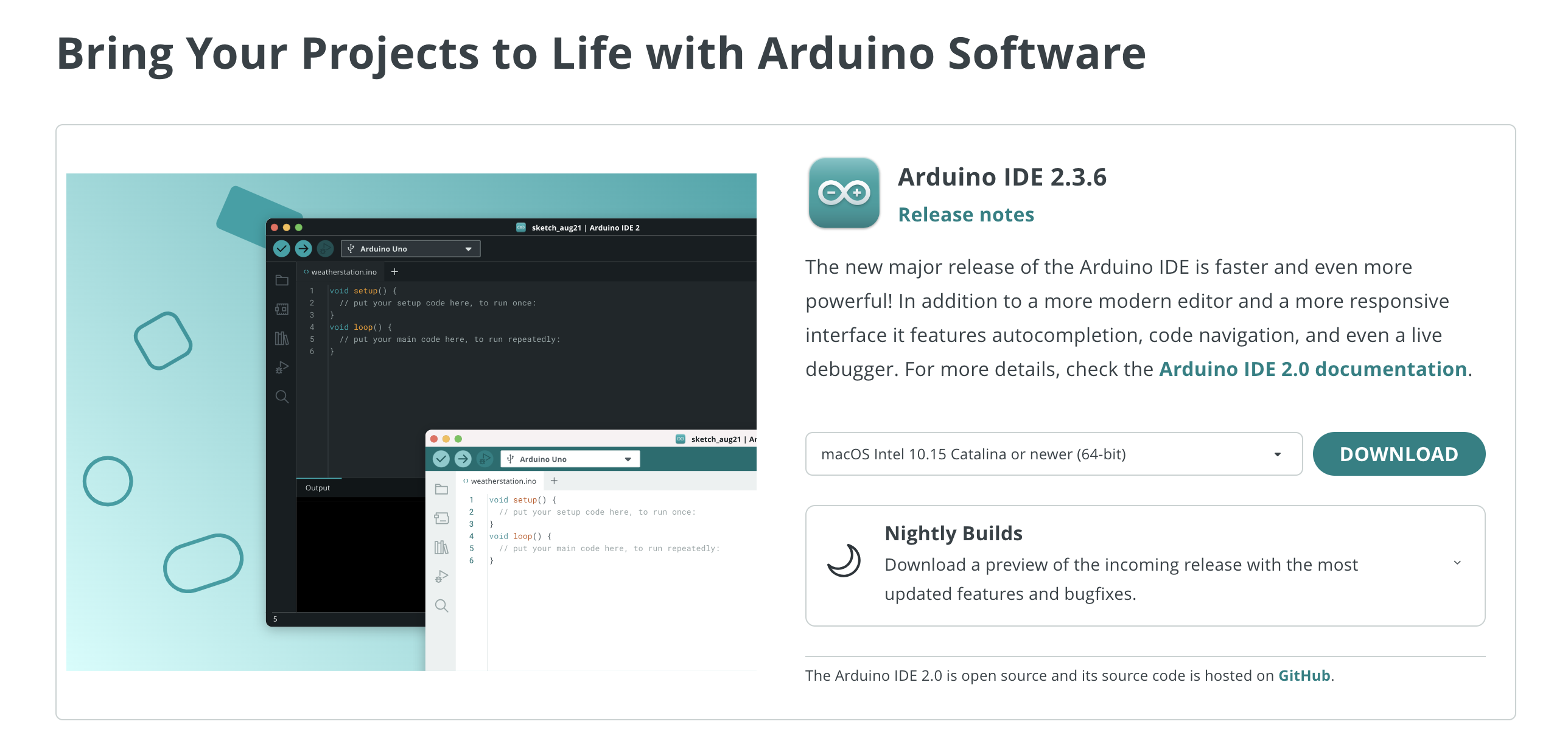
访问 Arduino 官网,下载 IDE 开发工具 https://www.arduino.cc/en/software/
安装最新 IDE 工具,截止 2025.11.01,最新版本为 2.3.6
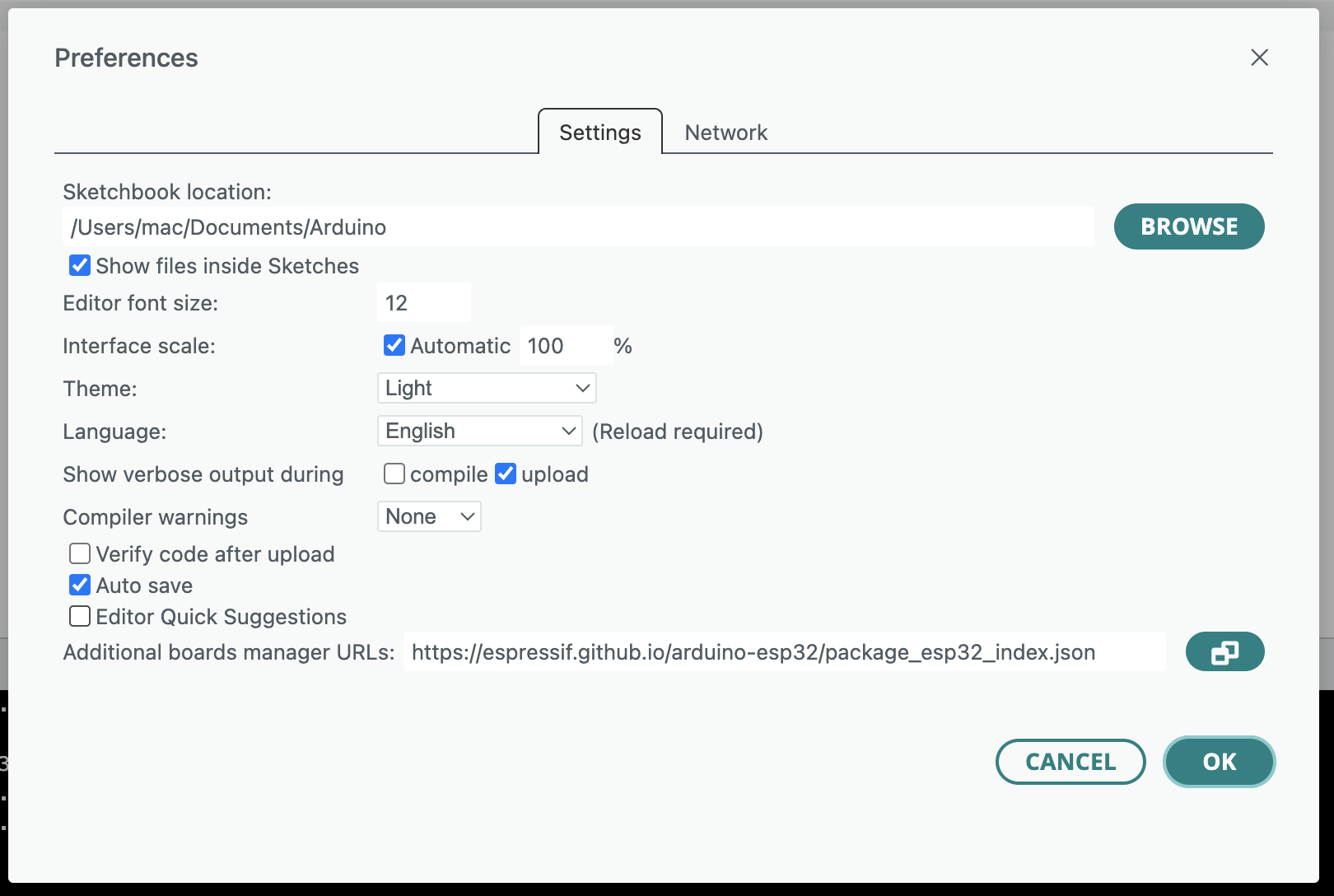
安装 ESP32 开发板库文件 [安装时注意网络环境, 搜索安装失败时可以考虑使用国内源]在安装开发板之前,需要在 IDE→Preferences→Settins 增加ESP32 开发板管理器的 URL:进入 Arduino IDE 的“文件>首选项”,在“附加开发板管理器网址”中输入官方提供的 JSON 链接( https://espressif.github.io/arduino-esp32/package_esp32_index.json 或国内镜像:https://jihulab.com/esp-mirror/espressif/arduino-esp32/-/raw/gh-pages/package_esp32_index_cn.json )
由于 ESP32 对应的编译环境比较大,下载时间比较长。确保每条地址单独占一行,无多余空格或字符
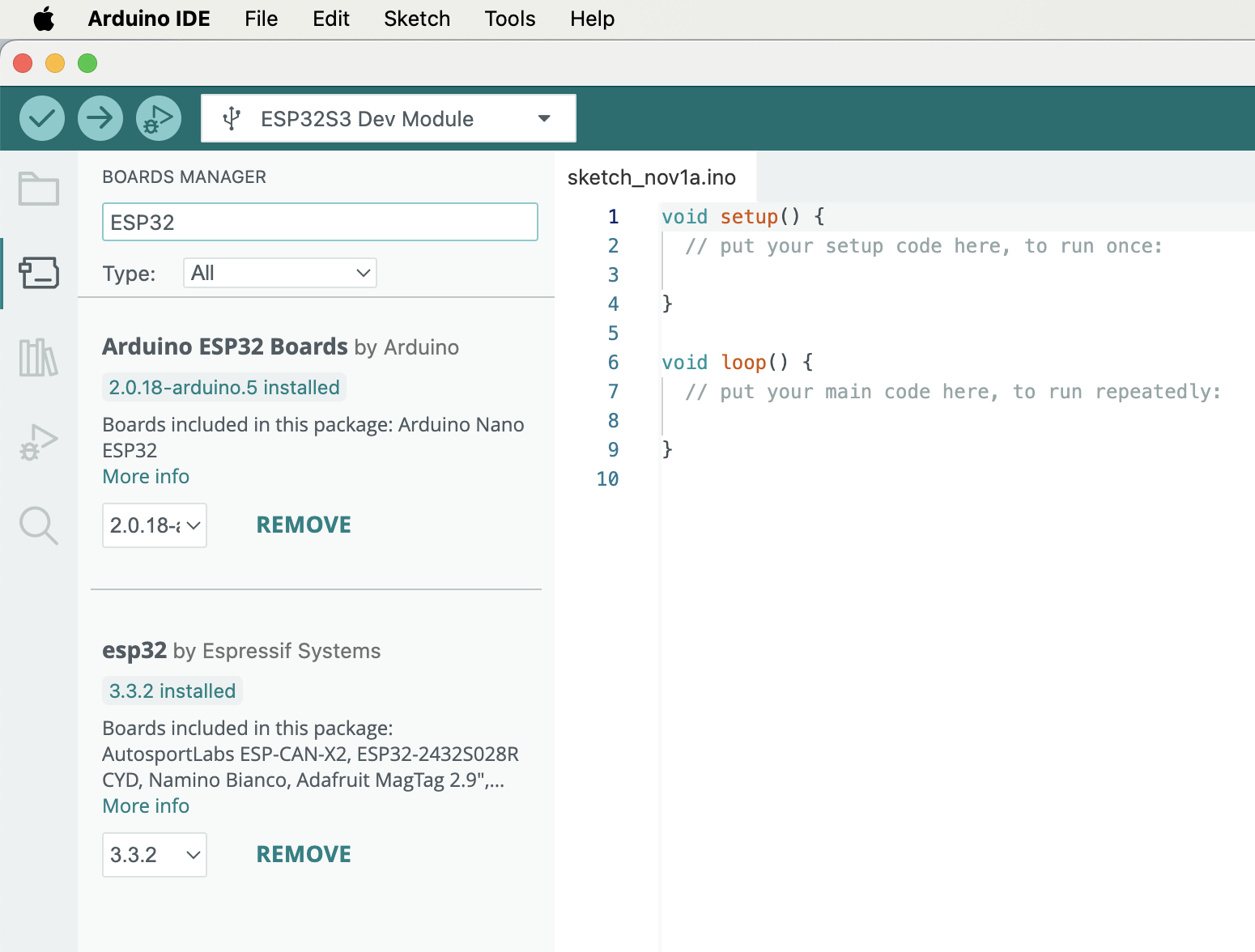
- 验证是否安装成功
a. IDE→tools→Board 中是否能找到对应的开发板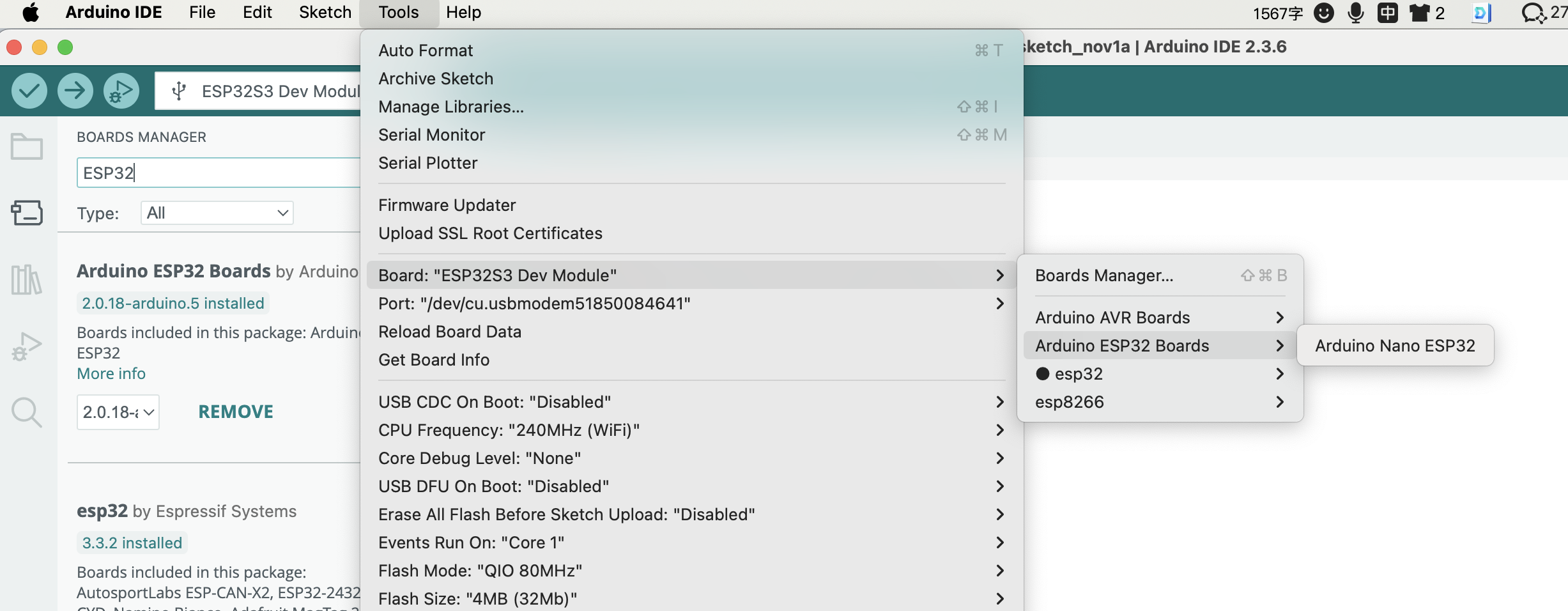
b. 插上开发板后是否能找到对应的串口端口号【如果有,说明安装成功】
环境验证 Blink 闪灯示例
Arduino IDE → 文件 → 示例 → 01 Basics → Blink
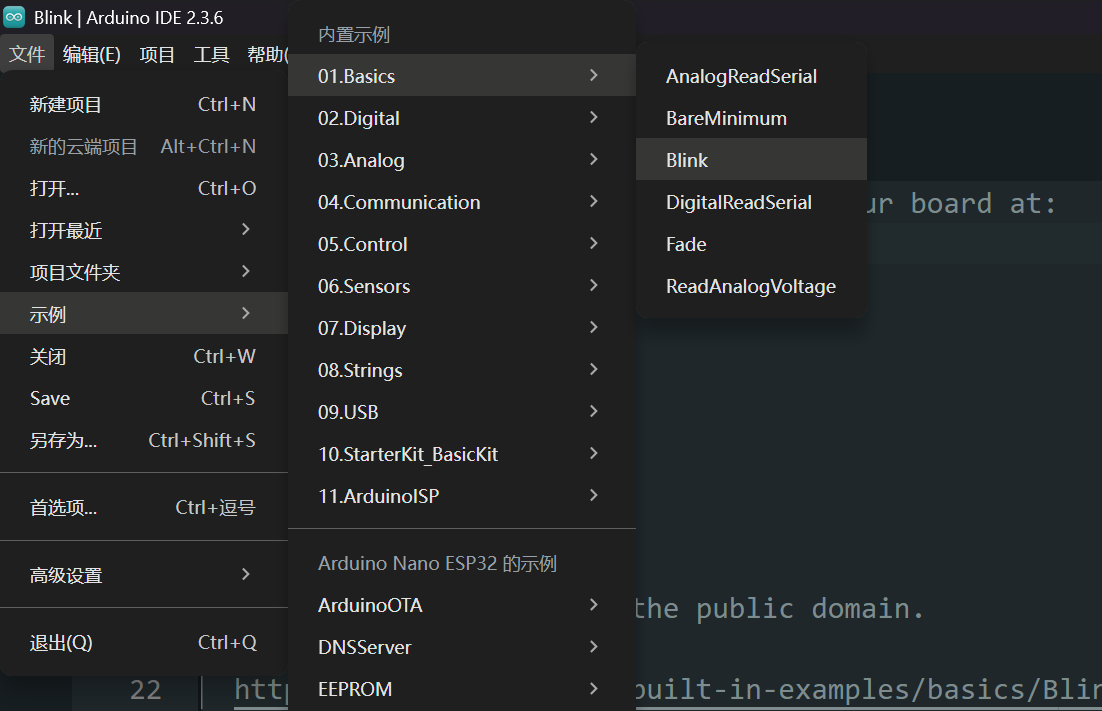
/*  https://docs.arduino.cc/built-in-examples/basics/Blink/
*/

// the setup function runs once when you press reset or power the board
void setup() {
  // initialize digital pin LED_BUILTIN as an output.
  pinMode(LED_BUILTIN, OUTPUT);
}

// the loop function runs over and over again forever
void loop() {
  digitalWrite(LED_BUILTIN, HIGH);  // turn the LED on (HIGH is the voltage level)
  delay(1000);                      // wait for a second
  digitalWrite(LED_BUILTIN, LOW);   // turn the LED off by making the voltage LOW
  delay(1000);                      // wait for a second
}
直接编译上传, 如果能正常编译, 上传到 Arduino 开发, 闪灯正常即为通过
正常的上传烧录打印如下
Opening DFU capable USB device...
Device ID 2341:0070
Device DFU version 0101
Claiming USB DFU Interface...
Setting Alternate Interface #0 ...
Determining device status...
DFU state(2) = dfuIDLE, status(0) = No error condition is present
DFU mode device DFU version 0101
Device returned transfer size 4096
Copying data from PC to DFU device

Download	[                         ]   0%            0 bytes
Download	[=                        ]   4%        12288 bytes
Download	[=                        ]   5%        16384 bytes
Download	[==                       ]   8%        24576 bytes
Download	[===                      ]  12%        36864 bytes
Download	[====                     ]  16%        49152 bytes
Download	[=====                    ]  21%        61440 bytes
Download	[======                   ]  25%        73728 bytes
Download	[=======                  ]  28%        81920 bytes
Download	[========                 ]  32%        94208 bytes
Download	[=========                ]  36%       106496 bytes
Download	[==========               ]  40%       118784 bytes
Download	[===========              ]  45%       131072 bytes
Download	[===========              ]  47%       139264 bytes
Download	[============             ]  49%       143360 bytes
Download	[=============            ]  52%       151552 bytes
Download	[==============           ]  56%       163840 bytes
Download	[===============          ]  60%       176128 bytes
Download	[================         ]  64%       188416 bytes
Download	[=================        ]  69%       200704 bytes
Download	[==================       ]  73%       212992 bytes
Download	[===================      ]  76%       221184 bytes
Download	[====================     ]  80%       233472 bytes
Download	[=====================    ]  84%       245760 bytes
Download	[======================   ]  88%       258048 bytes
Download	[=======================  ]  92%       270336 bytes
Download	[======================== ]  97%       282624 bytes
Download	[=========================] 100%       286592 bytes
Download done.
DFU state(7) = dfuMANIFEST, status(0) = No error condition is present
DFU state(2) = dfuIDLE, status(0) = No error condition is present
Done!