


 中文
中文WTDKP4C5-S1 入门指南
2025-12-31
更新历史
| 日期 | 版本 | 作者 | 更新内容 |
|---|---|---|---|
| 2025-12-3 | 1.0.0 | Pail | 首次更新文档 |
本教程介绍如何使用启明云端Github上基于WTDKP4C5-S1的示例项目,包括MIPI-DSI显示屏、摄像头等。
- 🎯 智能手机式 UI 界面 - 基于 ESP-Brookesia 框架
- 📱 多种应用程序 - 计算器、2048 游戏、摄像头应用
- 🤖 AI 视觉功能 - 人脸检测、行人检测
- 🖥️ 高清显示 - 支持 MIPI DSI 接口显示屏
- 🌐 网络连接 - WIF I& BLE 支持
- 📷 摄像头支持 - 1280x960 分辨率摄像头
启明云端 github
一、硬件准备
- 开发板:WTDKP4C5-S1
- 显示屏:MIPI-DSI 接口显示屏(EK79007)
- 摄像头:OV5647
MIPI-DSI 显示屏连接如下:
| LCD 显示屏 | WTDKP4C5-S1 |
|---|---|
| MIPI FPC 排线 | MIPI FPC 排线 |
| RST LCD 引脚 | J5 排针 GPIO27 引脚 |
| PWM 引脚 | J5 排针 GPIO26 引脚 |
| 5V 引脚 | J6 排针 VCC_5V 引脚 |
| GND 引脚 | J6 排针 GND 引脚 |
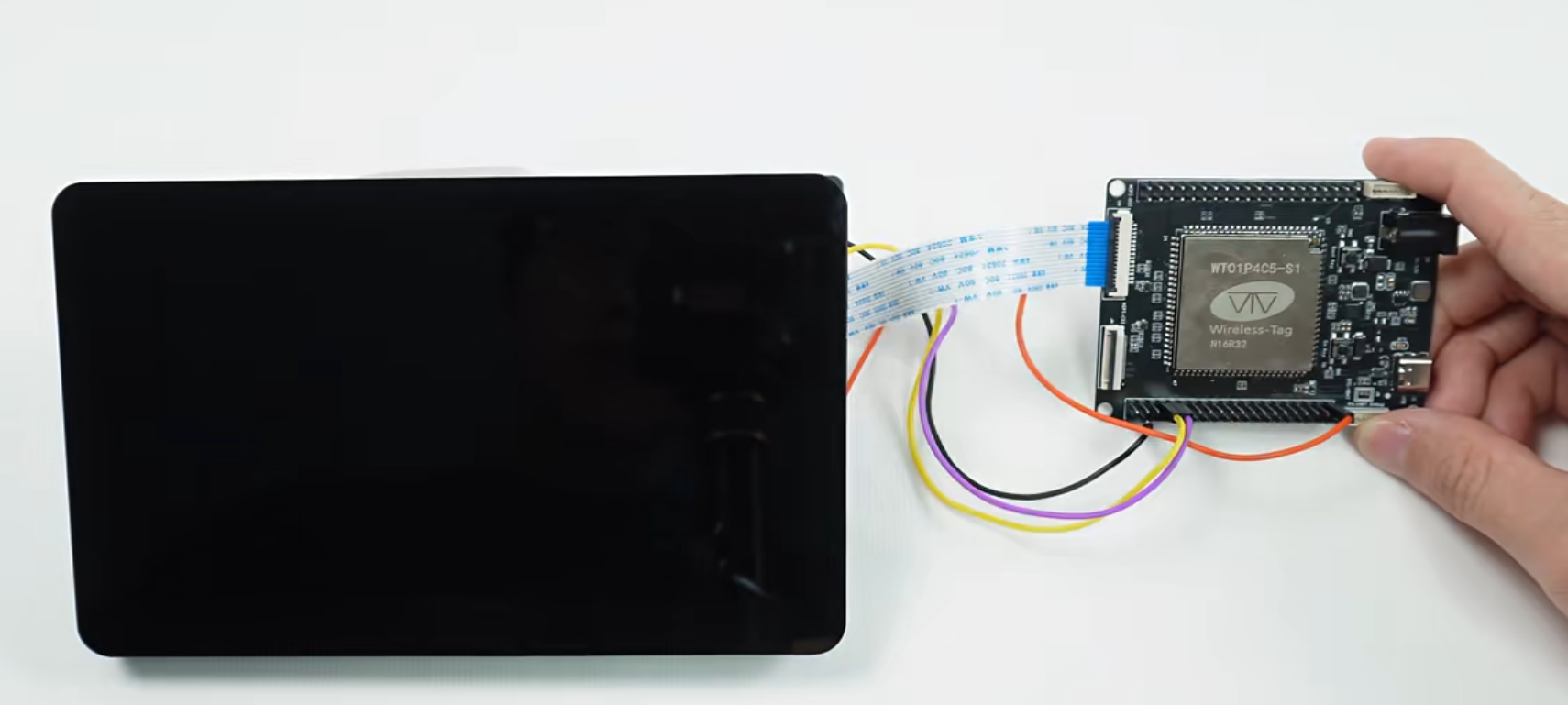
二、软件环境搭建
1.安装 ESP-IDF
请按照官方文档安装 ESP-IDF v5.5(commit:cbe9388f45dd8f33fc560c9727d429e8e107d476)或最新版本:
ESP-IDF 入门指南
2.克隆项目
git clone <项目仓库地址>
cd WTDKP4C5-S1-1V1
3.配置环境变量
. ${IDF_PATH}/export.sh
4.安装项目依赖
# 安装管理的组件依赖
idf.py reconfigure
5.编译和烧录
# 配置项目
idf.py menuconfig

# 编译项目
idf.py build

# 烧录到设备
idf.py flash

# 查看串口输出
idf.py monitor
三、WIFI/BLE
说明
- ESP32P4 自身是不支持 WIFI,因此使用 WIFI 则需要加一个支持 WIFI/BLE 的协处理器;
- 当前开发板搭配的是 ESP32C5,使用 SDIO 通信。
使用
ESP32P4 工程配置
打开 menuconfig 进入对应的配置选项,配置 esp32c5 作为 slave
(Top) → Component config → Wi-Fi Remote → choose slave target
需要注意引脚配置
克隆 esp32c5 工程
git clone https://github.com/espressif/esp-hosted-mcu.git
cd esp-hosted-mcu/slave
编译和烧录
# 设置目标芯片
idf.py set-target esp32c5

# 编译项目
idf.py build

# 烧录到设备
idf.py flash

# 查看串口输出
idf.py monitor
四、工程目录介绍
phone_wtdkp4c5_s1_board/
├── main/                           # 主程序源码
│   ├── main.cpp                    # 程序入口点
│   ├── CMakeLists.txt              # 主程序构建配置
│   └── idf_component.yml           # 组件依赖配置
├── components/                     # 自定义组件
│   ├── apps/                       # 应用程序组件
│   │   ├── calculator/             # 计算器应用
│   │   ├── camera/                 # 摄像头应用
│   │   ├── game_2048/              # 2048游戏
│   │   ├── setting/                # 设置应用
│   ├── human_face_detect/          # 人脸检测组件
│   ├── pedestrian_detect/          # 行人检测组件
│   ├── wtdkp4c5_s1_board/          # 开发板支持包(BSP)
├── CMakeLists.txt                  # 顶层构建配置
├── sdkconfig.defaults              # 默认SDK配置
├── partitions.csv                  # 分区表配置
└── README.md                       # 项目说明文档
核心组件说明
1. 主程序 (main/)
- main.cpp: 程序入口,初始化系统、显示、存储、网络等模块,并启动各个应用程序
2. 应用程序 (components/apps/)
- calculator/: 计算器应用,支持基本四则运算
- camera/: 摄像头应用,支持拍照和视频预览
- game_2048/: 经典 2048 数字游戏
- setting/: 系统设置应用
3. AI 视觉组件
- human_face_detect/: 人脸检测算法实现
- pedestrian_detect/: 行人检测算法实现
4. 硬件抽象层
- wtdkp4c5_s1_board/: 开发板专用 BSP,提供硬件初始化和驱动接口
五、分区配置
自定义分区表说明 (
partitions.csv)
- nvs (24KB): 非易失性存储,用于配置数据
- phy_init (4KB): RF 校准数据
- factory (9MB): 应用程序固件
六、开发调试
查看日志
idf.py monitor
性能监控说明
程序内置内存监控功能,每 5 秒输出一次内存使用情况:
- SRAM 使用状态
- PSRAM 使用状态
- 内存泄漏警告
常用配置项
通过 idf.py menuconfig 可以配置:
- 显示屏参数设置
- 摄像头分辨率配置
- Wi-Fi 配置
七、组件库版本要求
核心框架依赖
| 组件名称 | 版本要求 | 描述 |
|---|---|---|
| ESP-IDF | v5.5.0 (commit: cbe9388f45dd8f33fc560c9727d429e8e107d476) | ESP32 开发框架 |
| espressif/esp-brookesia | 0.4.2 | 智能手机式 UI 框架 |
| lvgl/lvgl | 8.4.0 | 轻量级图形库 |
| espressif/esp_lvgl_port | 2.6.0 | LVGL 移植层 |
显示屏和触摸组件
| 组件名称 | 版本要求 | 目标芯片 | 描述 |
|---|---|---|---|
| espressif/esp_lcd_ek79007 | 1.0.2 | ESP32P4 | EK79007 显示屏驱动 |
| espressif/esp_lcd_touch | 1.1.2 | 通用 | 触摸屏基础驱动 |
| esp_lcd_touch_gt911 | 1.1.3 | 通用 | GT911 触摸控制器 |
摄像头组件
| 组件名称 | 版本要求 | 目标芯片 | 描述 |
|---|---|---|---|
| espressif/esp_cam_sensor | 0.9.0 | ESP32P4 | 摄像头传感器驱动 |
| espressif/esp_sccb_intf | 0.0.5 | 通用 | SCCB 接口驱动 |
AI 和深度学习组件
| 组件名称 | 版本要求 | 目标芯片 | 描述 |
|---|---|---|---|
| espressif/esp-dl | 3.1.0 | ESP32S3/P4 | ESP 深度学习推理框架 |
网络和通信组件
| 组件名称 | 版本要求 | 目标芯片 | 描述 |
|---|---|---|---|
| espressif/esp_wifi_remote | 0.14.2 | ESP32P4/H2 | WiFi 远程控制 |
| espressif/esp_hosted | 2.0.13 | ESP32P4/H2 | ESP 托管模式 |
| espressif/eppp_link | 0.3.1 | 通用 | PPP 协议链接 |
| esp_serial_slave_link | 1.1.0~1 | 通用 | 串行从设备链接 |
工具和实用组件
| 组件名称 | 版本要求 | 描述 |
|---|---|---|
| espressif/cmake_utilities | 0.5.3 | CMake 构建工具 |
| chmorgan/esp-file-iterator | 1.0.0 | 文件迭代器工具 |
版本兼容性说明
关键版本要求
- ESP-IDF 版本: 建议使用 v5.5 特定 commit 版本,以确保所有组件的兼容性
- 目标芯片: 主要针对 ESP32P4 芯片,部分组件也支持 ESP32S3
- 依赖关系: 某些组件存在相互依赖关系,请确保版本匹配
更新注意: 升级组件版本时,请检查依赖关系和兼容性,避免出现不兼容问题
安装指定版本组件
如需安装特定版本的组件,可以在idf_component.yml中指定:
dependencies:
  espressif/esp-brookesia:
    version: "0.4.2"
  espressif/esp_video:
    version: "0.8.0~3"
    rules:
      - if: "target == esp32p4"
八、日志输出
- ESP32P4
I (25) boot: ESP-IDF v5.5-dirty 2nd stage bootloader
I (26) boot: compile time Sep  3 2025 16:32:17
I (26) boot: Multicore bootloader
I (27) boot: chip revision: v1.0
I (29) boot: efuse block revision: v0.3
I (33) qio_mode: Enabling default flash chip QIO
I (37) boot.esp32p4: SPI Speed      : 80MHz
I (41) boot.esp32p4: SPI Mode       : QIO
I (44) boot.esp32p4: SPI Flash Size : 16MB
I (48) boot: Enabling RNG early entropy source...
I (53) boot: Partition Table:
I (55) boot: ## Label            Usage          Type ST Offset   Length
I (62) boot:  0 nvs              WiFi data        01 02 00009000 00006000
I (68) boot:  1 phy_init         RF data          01 01 0000f000 00001000
I (75) boot:  2 factory          factory app      00 00 00010000 00900000
I (82) boot: End of partition table
I (85) esp_image: segment 0: paddr=00010020 vaddr=481a0020 size=34477ch (3426172) map
I (617) esp_image: segment 1: paddr=003547a4 vaddr=30100000 size=00068h (   104) load
I (618) esp_image: segment 2: paddr=00354814 vaddr=4ff00000 size=0b804h ( 47108) load
I (630) esp_image: segment 3: paddr=00360020 vaddr=48000020 size=1921e0h (1647072) map
I (883) esp_image: segment 4: paddr=004f2208 vaddr=4ff0b804 size=0f82ch ( 63532) load
I (896) esp_image: segment 5: paddr=00501a3c vaddr=4ff1b080 size=03940h ( 14656) load
I (901) esp_image: segment 6: paddr=00505384 vaddr=50108080 size=00020h (    32) load
I (908) boot: Loaded app from partition at offset 0x10000
I (908) boot: Disabling RNG early entropy source...
I (922) hex_psram: vendor id    : 0x0d (AP)
I (922) hex_psram: Latency      : 0x01 (Fixed)
I (922) hex_psram: DriveStr.    : 0x00 (25 Ohm)
I (923) hex_psram: dev id       : 0x03 (generation 4)
I (928) hex_psram: density      : 0x07 (256 Mbit)
I (932) hex_psram: good-die     : 0x06 (Pass)
I (936) hex_psram: SRF          : 0x02 (Slow Refresh)
I (941) hex_psram: BurstType    : 0x00 ( Wrap)
I (945) hex_psram: BurstLen     : 0x03 (2048 Byte)
I (950) hex_psram: BitMode      : 0x01 (X16 Mode)
I (954) hex_psram: Readlatency  : 0x04 (14 cycles@Fixed)
I (959) hex_psram: DriveStrength: 0x00 (1/1)
I (963) MSPI DQS: tuning success, best phase id is 0
I (1136) MSPI DQS: tuning success, best delayline id is 17
I esp_psram: Found 32MB PSRAM device
I esp_psram: Speed: 200MHz
I (1299) mmu_psram: .rodata xip on psram
I (1379) mmu_psram: .text xip on psram
I (1380) hex_psram: psram CS IO is dedicated
I (1380) cpu_start: Multicore app
I (1781) esp_psram: SPI SRAM memory test OK
I (1790) cpu_start: Pro cpu start user code
I (1790) cpu_start: cpu freq: 360000000 Hz
I (1790) app_init: Application information:
I (1791) app_init: Project name:     wtdkp4c5_s1_board
I (1795) app_init: App version:      81b17e8-dirty
I (1800) app_init: Compile time:     Sep  3 2025 16:32:14
I (1805) app_init: ELF file SHA256:  d41903034...
I (1809) app_init: ESP-IDF:          v5.5-dirty
I (1814) efuse_init: Min chip rev:     v0.1
I (1818) efuse_init: Max chip rev:     v1.99
I (1822) efuse_init: Chip rev:         v1.0
I (1826) heap_init: Initializing. RAM available for dynamic allocation:
I (1832) heap_init: At 4FF22630 len 00018990 (98 KiB): RAM
I (1837) heap_init: At 4FF3AFC0 len 00004BF0 (18 KiB): RAM
I (1842) heap_init: At 4FF40000 len 00040000 (256 KiB): RAM
I (1848) heap_init: At 501080A0 len 00007F60 (31 KiB): RTCRAM
I (1853) heap_init: At 30100068 len 00001F98 (7 KiB): TCM
I (1858) esp_psram: Adding pool of 27712K of PSRAM memory to heap allocator
I (1865) esp_psram: Adding pool of 55K of PSRAM memory gap generated due to end address alignment of irom to the heap allocator
I (1876) esp_psram: Adding pool of 46K of PSRAM memory gap generated due to end address alignment of drom to the heap allocator
W (1888) spi_flash: GigaDevice detected but related driver is not linked, please check option `SPI_FLASH_SUPPORT_GD_CHIP`
I (1898) spi_flash: detected chip: generic
I (1902) spi_flash: flash io: qio
I (1905) host_init: ESP Hosted : Host chip_ip[18]
I (1909) H_API: ESP-Hosted starting. Hosted_Tasks: prio:23, stack: 5120 RPC_task_stack: 5120
I (1918) H_API: ** add_esp_wifi_remote_channels **
I (1922) transport: Add ESP-Hosted channel IF[1]: S[0] Tx[0x4800d11a] Rx[0x4801f152]
--- 0x4800d11a: transport_drv_sta_tx at /home/qmsd/esp_project/work_example/WTDKP4C5-S1-1V1/build/../managed_components/espressif__esp_hosted/host/drivers/transport/transport_drv.c:248
--- 0x4801f152: esp_wifi_remote_channel_rx at /home/qmsd/esp_project/work_example/WTDKP4C5-S1-1V1/build/../managed_components/espressif__esp_wifi_remote/esp_wifi_remote_net.c:19
I (1930) transport: Add ESP-Hosted channel IF[2]: S[0] Tx[0x4800d05c] Rx[0x4801f152]
--- 0x4800d05c: transport_drv_ap_tx at /home/qmsd/esp_project/work_example/WTDKP4C5-S1-1V1/build/../managed_components/espressif__esp_hosted/host/drivers/transport/transport_drv.c:278
--- 0x4801f152: esp_wifi_remote_channel_rx at /home/qmsd/esp_project/work_example/WTDKP4C5-S1-1V1/build/../managed_components/espressif__esp_wifi_remote/esp_wifi_remote_net.c:19
sdio_mempool_create free:28607220 min-free:28607220 lfb-def:28311552 lfb-8bit:28311552

I (1945) H_SDIO_DRV: sdio_data_to_rx_buf_task started
I (1949) main_task: Started on CPU0
I (1953) main_task: Calling app_main()
I (1959) LVGL: Starting LVGL task
W (1959) ledc: GPIO 26 is not usable, maybe conflict with others
I (1965) WT99P4C5_S1_BOARD: MIPI DSI PHY Powered on
I (1970) WT99P4C5_S1_BOARD: Install MIPI DSI LCD control panel
I (1975) WT99P4C5_S1_BOARD: Install EK79007 LCD control panel
I (1980) ek79007: version: 1.0.2
I (2147) WT99P4C5_S1_BOARD: Display initialized
I (2147) WT99P4C5_S1_BOARD: Display resolution 1024x600
E (2148) lcd_panel: esp_lcd_panel_swap_xy(50): swap_xy is not supported by this panel
W (2152) i2c.master: Please check pull-up resistances whether be connected properly. Otherwise unexpected behavior would happen. For more detailed information, please read docs
I (2168) GT911: I2C address initialization procedure skipped - using default GT9xx setup
I (2176) GT911: TouchPad_ID:0x39,0x31,0x31
I (2179) GT911: TouchPad_Config_Version:89
I (2183) WT99P4C5_S1_BOARD: Setting LCD backlight: 100%
I (2188) app_main: Display ESP-Brookesia phone demo
[WARN] [esp_brookesia_core.cpp:46](getDisplaySize): Display is not set, use default display
[INFO] [esp_brookesia_core.cpp:204](beginCore): Library version: 0.4.1
[WARN] [esp_brookesia_phone_manager.cpp:72](begin): No touch device is set, try to use default touch device
[WARN] [esp_brookesia_phone_manager.cpp:76](begin): Using default touch device(@0x0x484e5d30)
I (2242) EUI_Setting: Load ble_en: 0
I (2243) EUI_Setting: Load brightness: 51
I (2247) EUI_Setting: Load volume: 9
I (2250) EUI_Setting: Load wifi_en: 1
I (2253) WT99P4C5_S1_BOARD: Setting LCD backlight: 51%
I (2259) transport: Attempt connection with slave: retry[0]
I (2260) Game2048: Load score: 1536
W (2264) H_SDIO_DRV: Reset slave using GPIO[13]
I (2269) ov5647: Detected Camera sensor PID=0x5647
I (2271) os_wrapper_esp: GPIO [13] configured
I (2338) app_video: version: 0.8.0
I (2338) app_video: driver:  MIPI-CSI
I (2338) app_video: card:    MIPI-CSI
I (2338) app_video: bus:     esp32p4:MIPI-CSI
I (2341) app_video: width=1280 height=960
I (2361) app_camera_pipeline: new elements[0]:0x490a8d04, internal:1
I (2377) app_camera_pipeline: new elements[1]:0x49308d08, internal:1
I (2393) app_camera_pipeline: new elements[2]:0x49568d0c, internal:1
I (2409) app_camera_pipeline: new elements[3]:0x497c8d10, internal:1
I (2409) app_camera_pipeline: new pipeline 0x484e7ec0, elem_num:4
I (2410) app_camera_pipeline: new elements[0]:0x484e7fd0, internal:1
I (2416) app_camera_pipeline: new elements[1]:0x484e8024, internal:1
I (2422) app_camera_pipeline: new elements[2]:0x484e8078, internal:1
I (2428) app_camera_pipeline: new elements[3]:0x484e80cc, internal:1
I (2434) app_camera_pipeline: new pipeline 0x484e7f48, elem_num:4
I (2442) MEM:    Biggest /     Free /    Total
          SRAM : [240 / 283 / 413] KB
         PSRAM : [5888 / 6067 / 27813] KB
I (3482) sdio_wrapper: SDIO master: Slot 1, Data-Lines: 4-bit Freq(KHz)[40000 KHz]
I (3482) sdio_wrapper: GPIOs: CLK[18] CMD[19] D0[14] D1[15] D2[16] D3[17] Slave_Reset[13]
I (3486) sdio_wrapper: Queues: Tx[20] Rx[20] SDIO-Rx-Mode[1]
Name:
Type: SDIO
Speed: 40.00 MHz (limit: 40.00 MHz)
Size: 0MB
CSD: ver=1, sector_size=0, capacity=0 read_bl_len=0
SCR: sd_spec=0, bus_width=0
TUPLE: DEVICE, size: 3: D9 01 FF
TUPLE: MANFID, size: 4
  MANF: 0092, CARD: 6666
TUPLE: FUNCID, size: 2: 0C 00
TUPLE: FUNCE, size: 4: 00 00 02 32
TUPLE: CONFIG, size: 5: 01 01 00 02 07
TUPLE: CFTABLE_ENTRY, size: 8
  INDX: C1, Intface: 1, Default: 1, Conf-Entry-Num: 1
  IF: 41
  FS: 30, misc: 0, mem_space: 1, irq: 1, io_space: 0, timing: 0, power: 0
  IR: 30, mask: 1,   IRQ: FF FF
  LEN: FFFF
TUPLE: END
I (3564) sdio_wrapper: Function 0 Blocksize: 512
I (3568) sdio_wrapper: Function 1 Blocksize: 512
I (3572) H_SDIO_DRV: Card init success, TRANSPORT_RX_ACTIVE
I (3577) transport: set_transport_state: 1
I (3581) transport: Waiting for esp_hosted slave to be ready
I (3645) H_SDIO_DRV: SDIO Host operating in STREAMING MODE
I (3645) H_SDIO_DRV: Open data path at slave
I (3645) H_SDIO_DRV: Starting SDIO process rx task
I (3672) H_SDIO_DRV: Received ESP_PRIV_IF type message
I (3672) transport: Received INIT event from ESP32 peripheral
I (3673) transport: EVENT: 12
I (3674) transport: Identified slave [esp32c5]
I (3678) transport: EVENT: 11
I (3681) transport: capabilities: 0xd
I (3685) transport: Features supported are:
I (3688) transport:      * WLAN
I (3691) transport:        - HCI over SDIO
I (3695) transport:        - BLE only
I (3698) transport: EVENT: 13
W (3700) transport: === ESP-Hosted Version Warning ===
Version on Host is NEWER than version on co-processor
RPC requests sent by host may encounter timeout errors
or may not be supported by co-processor
W (3718) transport: === ESP-Hosted Version Warning ===
I (3723) transport: ESP board type is : 23

I (3727) transport: Base transport is set-up, TRANSPORT_TX_ACTIVE
I (3733) H_API: Transport active
I (3736) transport: Slave chip Id[12]
I (3740) transport: raw_tp_dir[-], flow_ctrl: low[60] high[80]
I (3745) transport: transport_delayed_init
I (3749) esp_cli: Remove any existing deep_sleep cmd in cli
I (3754) esp_cli: Registering command: crash
I (3758) esp_cli: Registering command: reboot
I (3762) esp_cli: Registering command: mem-dump
I (3767) esp_cli: Registering command: task-dump
I (3771) esp_cli: Registering command: cpu-dump
I (3775) esp_cli: Registering command: heap-trace
I (3780) esp_cli: Registering command: sock-dump
I (3784) esp_cli: Registering command: host-power-save
I (3789) hci_stub_drv: Host BT Support: Disabled
I (3793) H_SDIO_DRV: Received INIT event
I (3797) H_SDIO_DRV: Event type: 0x22
I (3800) H_SDIO_DRV: Write thread started
I (4356) EUI_Setting: wifi_init done
I (4360) RPC_WRAP: ESP Event: wifi station started
I (4371) RPC_WRAP: ESP Event: wifi station started
I (4509) RPC_WRAP: sta mac address is [d0:cf:13:e0:f5:ec]
I (7450) MEM:    Biggest /     Free /    Total
          SRAM : [240 / 280 / 413] KB
         PSRAM : [5888 / 6067 / 27813] KB
I (11519) RPC_WRAP: ESP Event: Station mode: Connected
I (11566) RPC_WRAP: sta mac address is [d0:cf:13:e0:f5:ec]
I (11566) esp_wifi_remote: esp_wifi_internal_reg_rxcb: sta: 0x481694f2
--- 0x481694f2: wifi_sta_receive at /home/qmsd/esp/esp5.5/esp-idf/components/esp_wifi/src/wifi_netif.c:39
I (11567) EUI_Setting: connected to ap SSID:, password:.
I (12441) sntp: Time is not set yet. Connecting to WiFi and getting time over NTP.
I (12441) sntp: Initializing SNTP
I (12441) sntp: Waiting for system time to be set... (1/10)
I (12450) MEM:    Biggest /     Free /    Total
          SRAM : [232 / 278 / 413] KB
         PSRAM : [5888 / 6067 / 27813] KB